In logistics, companies usually track costs around transportation, warehousing, delivery timelines, and customs clearance. In practice, part of the margin can be lost much earlier: when the company is still processing commercial invoices, specifications, packing lists, foreign trade documents, and related emails manually.
Until a document becomes a structured set of business-ready data, it is not very useful. Someone has to read it, translate it, extract the required fields, normalize them to the company’s internal format, check ambiguous areas, and pass the result to the right teams and systems. If the company handles international logistics or supports clients with customs clearance, there is one more layer: invoice data must be reliable enough for preparing customs declarations, checking product attributes, and supporting the work of customs brokers.
This problem is especially visible in companies that work with many foreign suppliers:
- invoices arrive in different formats, in different languages, and with different logic for describing products;
- the same document may be needed by logistics teams, translators, managers, and customs clearance specialists, but each role needs it in a different format;
- an error in a line item, SKU, quantity, color, size, country of origin, or commodity code can move further down the chain and become a problem at the declaration or verification stage.
As a result, employees spend hours on manual checks, data transfer, and repetitive validation. The company gradually accumulates hidden costs: processing time grows, the back office becomes overloaded, seasonal peaks become harder to manage, and any error in product attributes starts to affect the next stages of the process, including delivery, internal accounting, and customs clearance.
This is where AI for logistics and AI for customs brokers can create practical business value. The point is not fashionable “document recognition”. The point is reducing manual work, accelerating data preparation for internal systems and customs procedures, lowering the number of errors, and making the whole document workflow more predictable.
In this article, we will look at why manual invoice processing in logistics can eat into profit margins, where the losses actually appear, and how AI-powered invoice automation can generate real savings for the business.
Build a Smarter Invoice Automation Engine
What a typical manual process looks like and where money is lost
From the outside, invoice processing may look like a simple office routine. In real logistics operations, however, this process is almost never linear.
A company usually works with many suppliers at once, and each supplier prepares documents in its own way. Commercial invoices arrive as PDFs, Excel files, scans, emails, and mixed formats. Some documents contain short and clear line items. Others include hundreds of positions, abbreviations, non-standard product names, different languages, and attributes that need to be interpreted correctly.
Then the most expensive part begins: the same document is not needed by just one employee, but by several participants in the process. Translators need one set of fields and one processing logic. Logistics teams need data for internal operations and shipment control. Managers need information for client communication. A customs broker or foreign trade specialist needs structured data for checks and further preparation of a customs declaration.
This is exactly where manual processing starts to eat into margins:
- Employees spend time not on decision-making, but on repetitive mechanical steps: opening an email, downloading attachments, finding the right fields, translating entities, converting values to the internal format, checking questionable areas, and preparing an output document according to the company’s rules.
- The same invoice may effectively be processed several times. Instead of extracting the data once and reusing it across all scenarios, different employees read the same document again, make their own edits, and create a risk of inconsistencies.
- In logistics, document processing does not stop at OCR. After invoice recognition, companies often still need line-item normalization, translation, specification generation, sanctions checks, color and size verification, and preparation of data for a customs declaration or other internal documents.
- During seasonal peaks, a manual process becomes especially vulnerable. When volumes are moderate, the company may not notice the cost of manual processing. But once the document flow grows, queues, delays, overtime, and dependency on specific employees become visible very quickly.
That is why the main cost of manual invoice processing is not only payroll hours. The business loses document throughput, process predictability, and the ability to scale volume without increasing the back office at the same pace. In the long term, this is what starts to reduce margins.
Why standard invoice recognition does not solve the problem
When a company first starts thinking about invoice automation, the task often seems simple: the system just needs to read the document. At this stage, many teams look at OCR, ready-made recognition services, or off-the-shelf products. But in logistics and customs clearance, the problem almost never ends with text extraction.
Yes, a system can extract the invoice number, date, seller, buyer, currency, totals, line items, quantities, and prices. But this is not enough for the business. After reading the document, the data still needs to be interpreted, translated, normalized according to the company’s internal rules, routed across different workflows, and transformed into the final working format.
For example, in a similar process, the same set of documents required different processing for translators, logistics teams, and managers, while the final output had to be transferred into different tools and work scenarios. If we add customs preparation on top of this, it becomes clear why basic OCR is not enough: the system needs to read the document and understand the business logic behind it.
For the same reason, an off-the-shelf solution does not always work for logistics companies. Every company has its own document structure, specification rules, validation requirements, and internal systems. A solution that works for one company may not fit another. That is why document recognition often needs an additional AI layer adapted to the specific business process.
Where AI automation creates economic value
The economic effect in logistics appears not when the system “learns to read an invoice”, but when the document moves through the workflow faster, with fewer manual actions and fewer returns for correction. This is the key difference between text recognition and real document automation in logistics.
Reducing invoice processing time
The first and most obvious source of value is the reduction of time spent on initial document processing. Employees spend a lot of time on repetitive actions: finding the required fields, translating line items, converting data into the internal format, checking whether everything is filled in correctly, and only then passing the information forward.
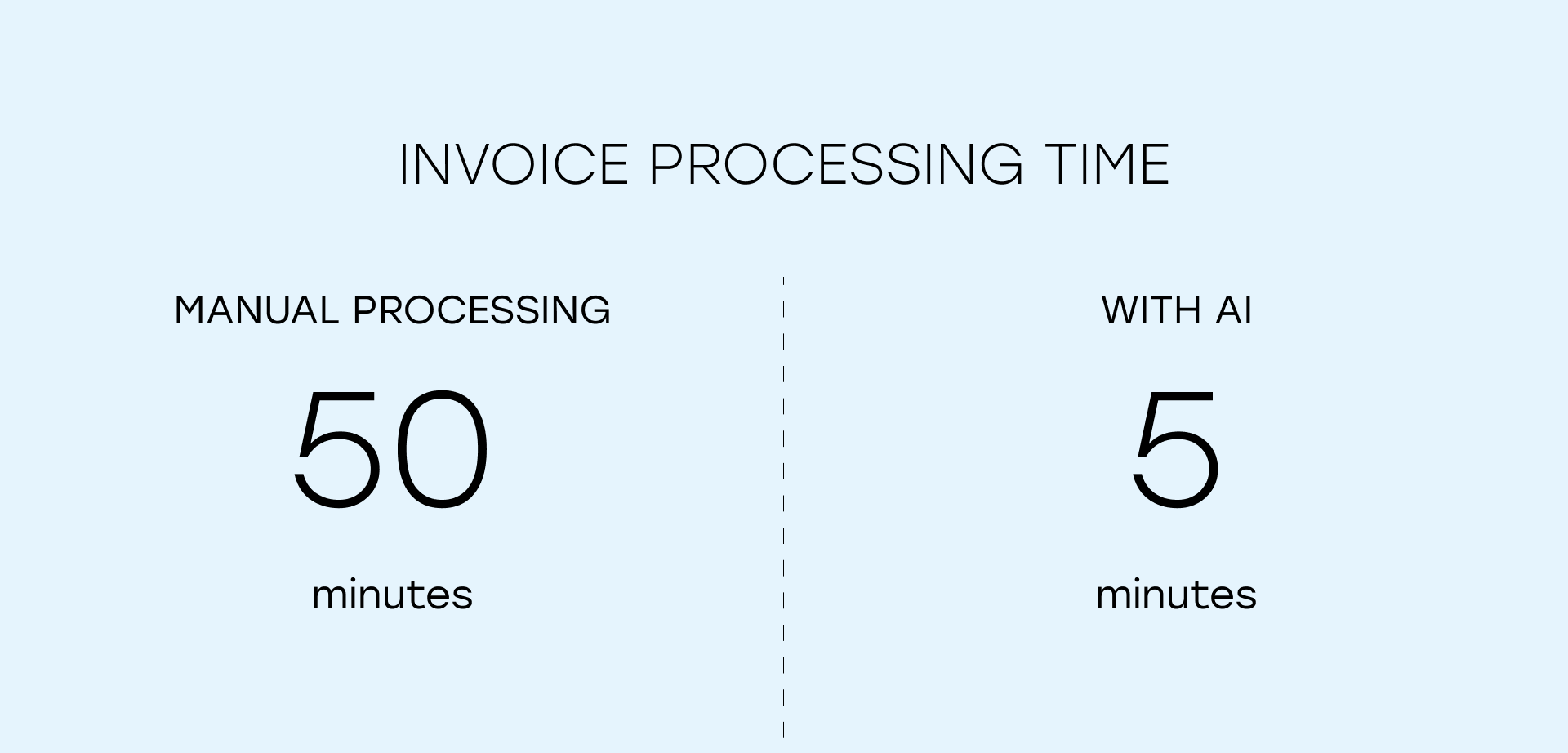
For the business, the value is not that the invoice was recognized. The value is that the company can quickly receive a specification, translated line items, structured data for internal systems, and prepared data for a customs declaration. Automation accelerates not one isolated step, but the movement of the document through the entire chain.
Reducing repeated manual work across departments
The second source of savings is the reduction of repeated manual work between departments. In logistics, the same document is rarely processed by just one person. Some employees extract and clarify data for translation and specifications. Others apply their own checks at the next stage. Others use the same data for internal systems or customs clearance.

If an AI system automatically prepares the required outputs for different roles and scenarios, it reduces not only the workload of an individual employee, but also the number of times the document is manually touched inside the company.
Reducing the workload for translators, logistics teams, and customs specialists
The third area of savings is the reduced workload for roles that are often difficult to scale. In these workflows, a significant share of time is spent not by technical specialists, but by translators, logistics specialists, managers, and employees responsible for foreign trade documents.
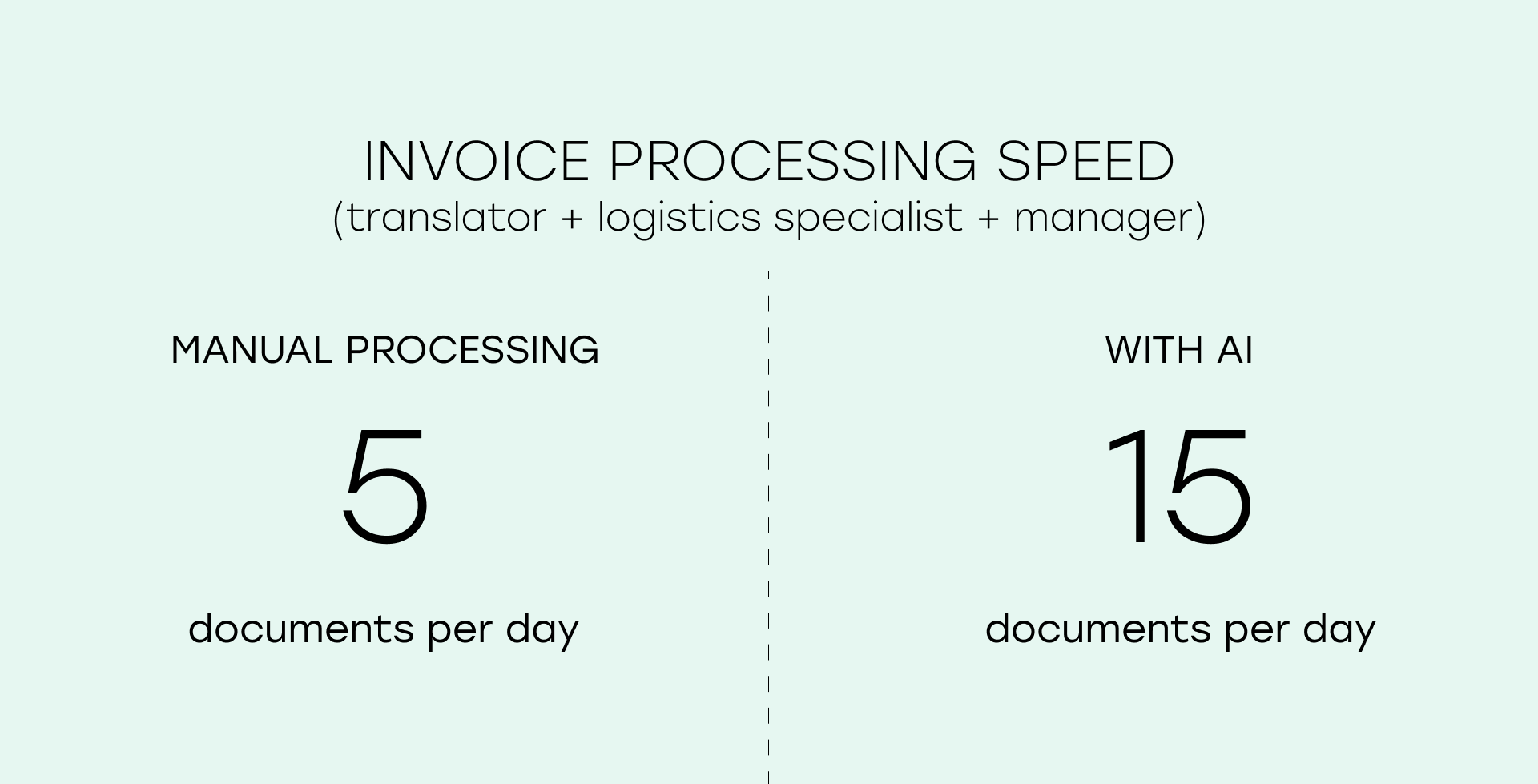
Automation affects not an abstract KPI, but expensive working time. The more routine document work the system takes over, the less the business needs to expand the team when volumes grow or seasonal peaks arrive.
Checking risky areas before they become operational problems
The fourth source of value is the reduction of errors and exceptions before they turn into delays. In logistics, the expensive issues are not only obvious mistakes in amounts or SKUs, but also ambiguous product attributes that surface later and slow down the next stages.
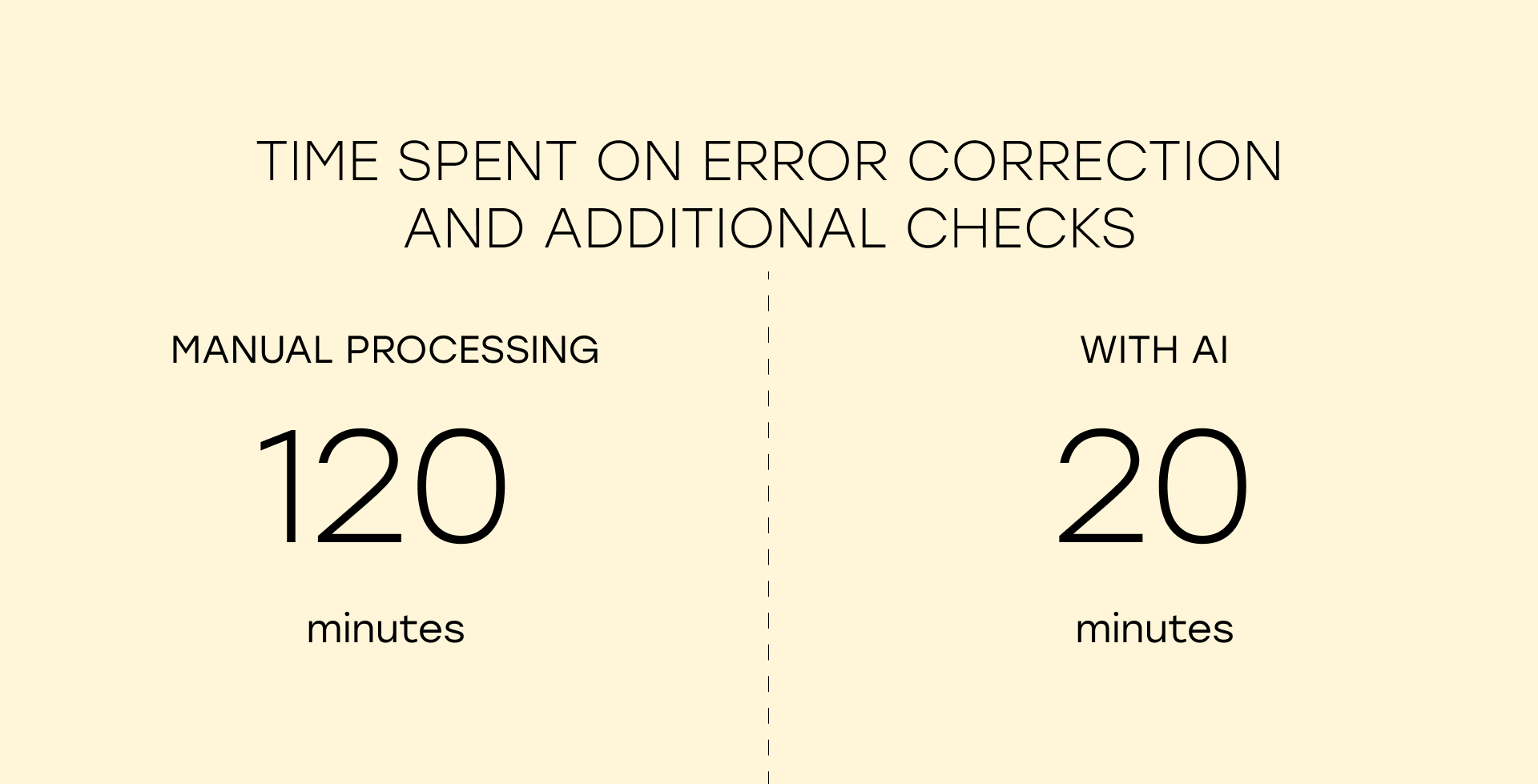
That is why additional savings come not only from extraction and translation, but also from built-in checks. For example, sanctions screening helps identify risky items earlier, while color, size, brand, or product category validation helps detect inconsistencies before they create problems in further processing.
Maintaining throughput during seasonal peaks
The fifth effect appears during seasonal peaks and high-load periods. When the document flow is moderate, the company may not notice how much time is spent on manual processing. But once volumes increase, the cost of not having automation becomes very visible.
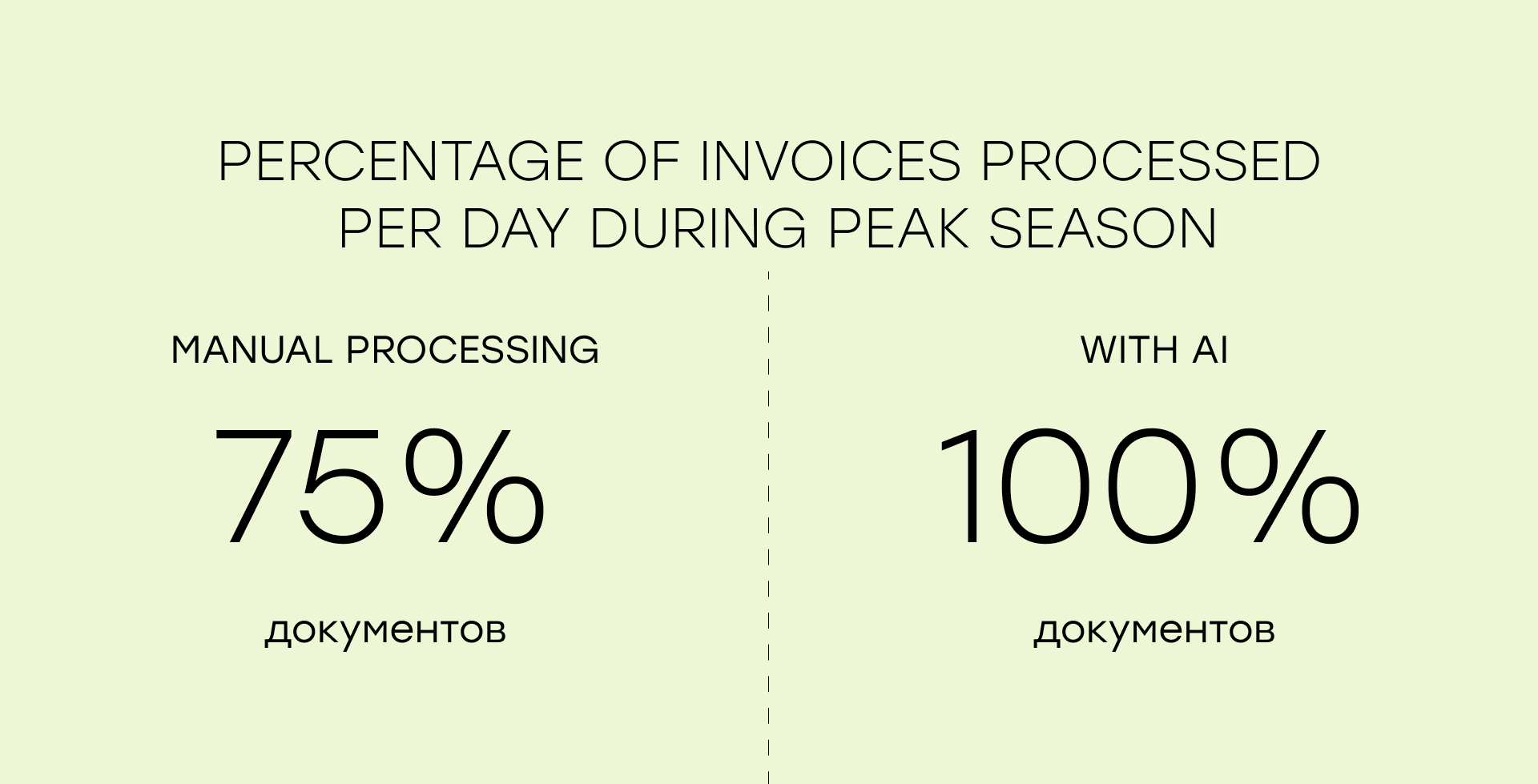
Under high load, companies often need to expand the team, redistribute people, and work overtime. Incoming document volume may grow two or three times, while a manual process scales almost linearly: more documents mean more people and more hours. An AI system scales differently: it handles primary processing and leaves employees to review ambiguous cases.
Automating incoming email workflows
Finally, there is one more source of savings that is often underestimated: automation of incoming emails and follow-up actions. If the document flow starts in the inbox, manual work begins there as well. Someone needs to open the email, understand what came in, download attachments, check discrepancies, and in some cases send a reply with clarifying questions or additional documents.
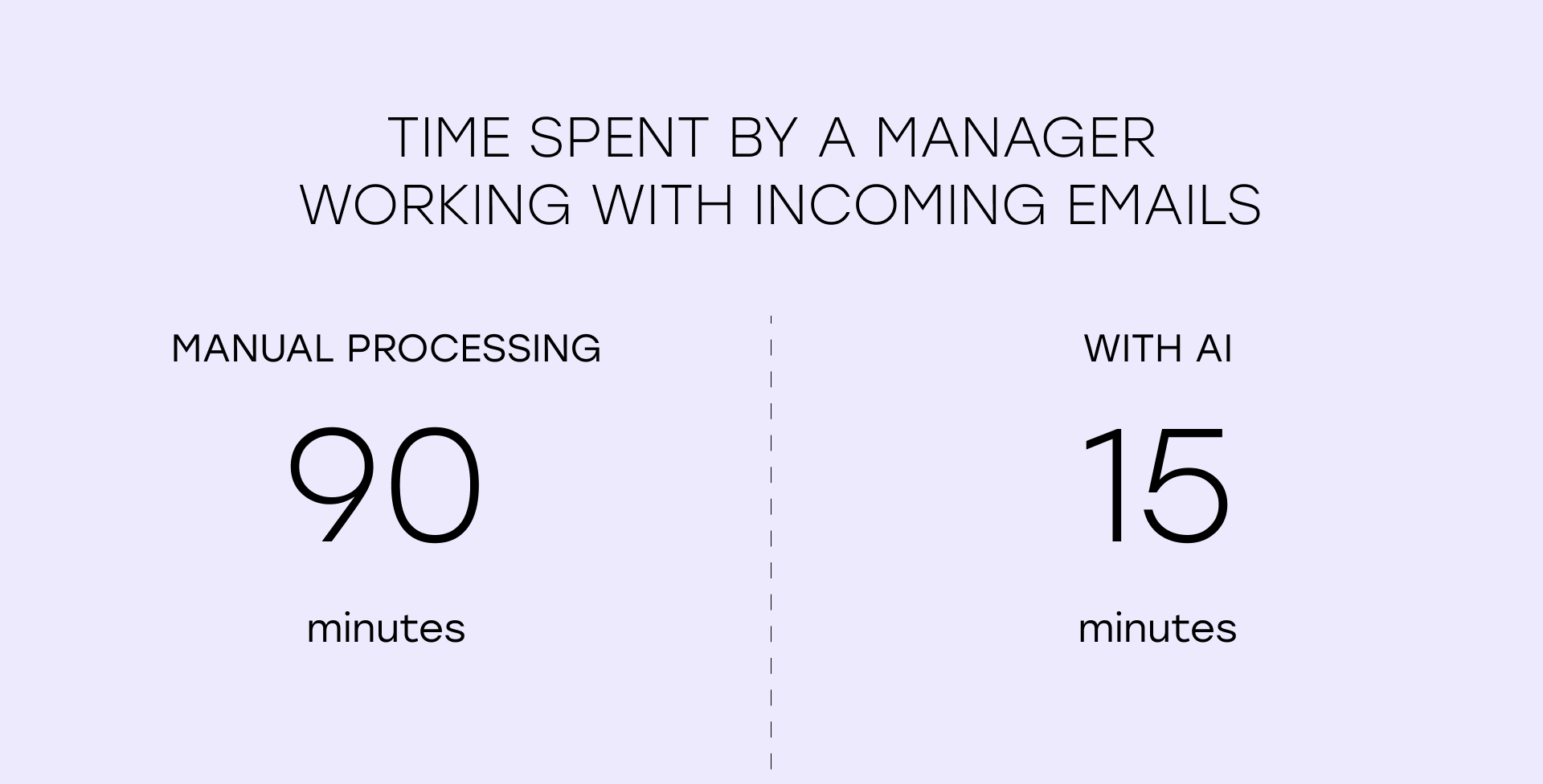
If this stage is also automated, the company saves time right at the entry point and starts the entire downstream process faster. An AI system can collect attachments, detect document types, launch the right processing scenario, send data to internal accounting or operational systems, and prepare draft replies for documents with discrepancies.
Business value of AI for logistics companies
The real economic effect of AI automation in logistics comes from several components at once:
- fewer manual hours per document;
- less repeated processing between departments;
- faster preparation of specifications and internal data;
- faster preparation of data for customs clearance;
- fewer errors, returns, and manual checks;
- higher stability under load and better process scalability without constant back-office growth.
Not every company can immediately translate this into a precise ROI number. But almost every company can quickly see the effect in reduced processing time, lower workload for logistics teams and customs brokers, and a more predictable document flow.
What tasks an AI system can handle in logistics beyond invoice recognition
When logistics teams talk about document automation, the discussion often comes down to OCR: the system reads an invoice and extracts fields from it. In practice, however, the economic effect appears when the company automates not one step, but the full set of routine actions around the document.
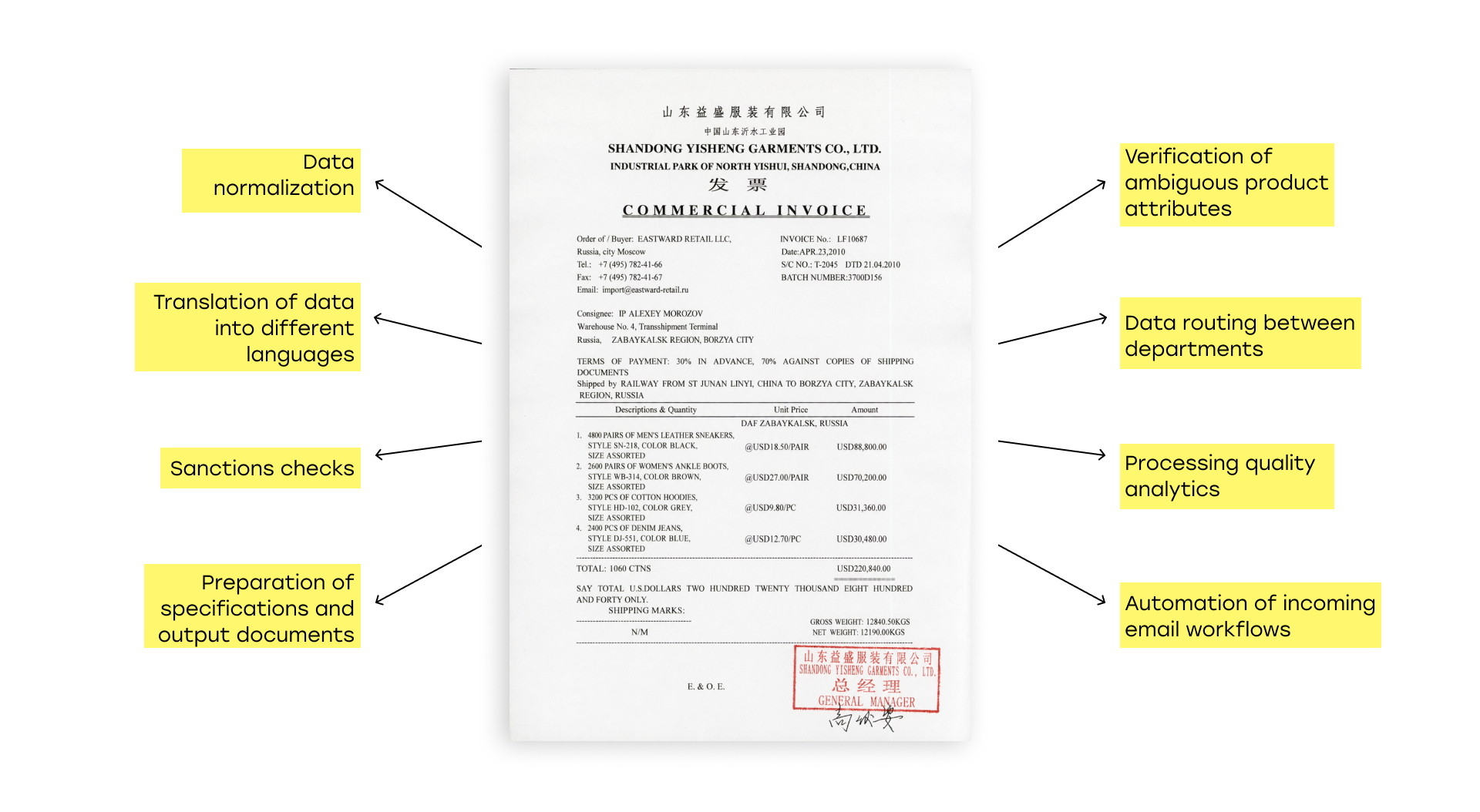
- Data normalization. An AI system can standardize product names, model names, colors, sizes, brands, and other fields according to the company’s internal format.
- Translation of line items and attributes. Documents arrive in different languages, while the system can automatically translate the required entities and prepare data in the company’s working language.
- Generation of specifications and output documents. After extraction and translation, an AI system can prepare final documents in the format the company needs: specifications, internal forms, data for upload into an accounting system, or files for the next participant in the workflow.
- Preparation of data for customs clearance. The system can structure line items, amounts, quantities, countries of origin, SKUs, and other fields so they can be used later when preparing customs declarations.
- Sanctions and compliance checks. Some products and shipments require additional checks for restrictions. This step can be automated so employees do not repeat the same checks manually for every document or line item.
- Validation of ambiguous product attributes. An AI system can help clarify parameters that are often written inconsistently, such as color, size, or product category.
- Data routing between departments. An AI system can automatically prepare different data sets for translators, logistics teams, managers, and customs specialists.
- Automation of incoming emails. The system can collect attachments, detect document types, launch the right processing scenario, and prepare data for the next steps.
- Drafting reply emails. If the system detects discrepancies, missing data, or other issues in incoming emails, it can prepare a draft reply for an employee to review.
- Processing quality analytics. The system can show which fields most often contain errors, where employees most often intervene manually, which documents take longer to process, and which stages create bottlenecks.
Schedule Your Free AI Assessment
Interesting in real declarations automation? AI extracts line items, matches products, and prepares data for customs declaration.
Where the economic benefit comes from and how to calculate it
For a logistics company, document automation is valuable not because “AI does something modern”, but because it removes expensive manual work from repetitive operations and accelerates the document across the entire workflow.
The basic formula looks like this:
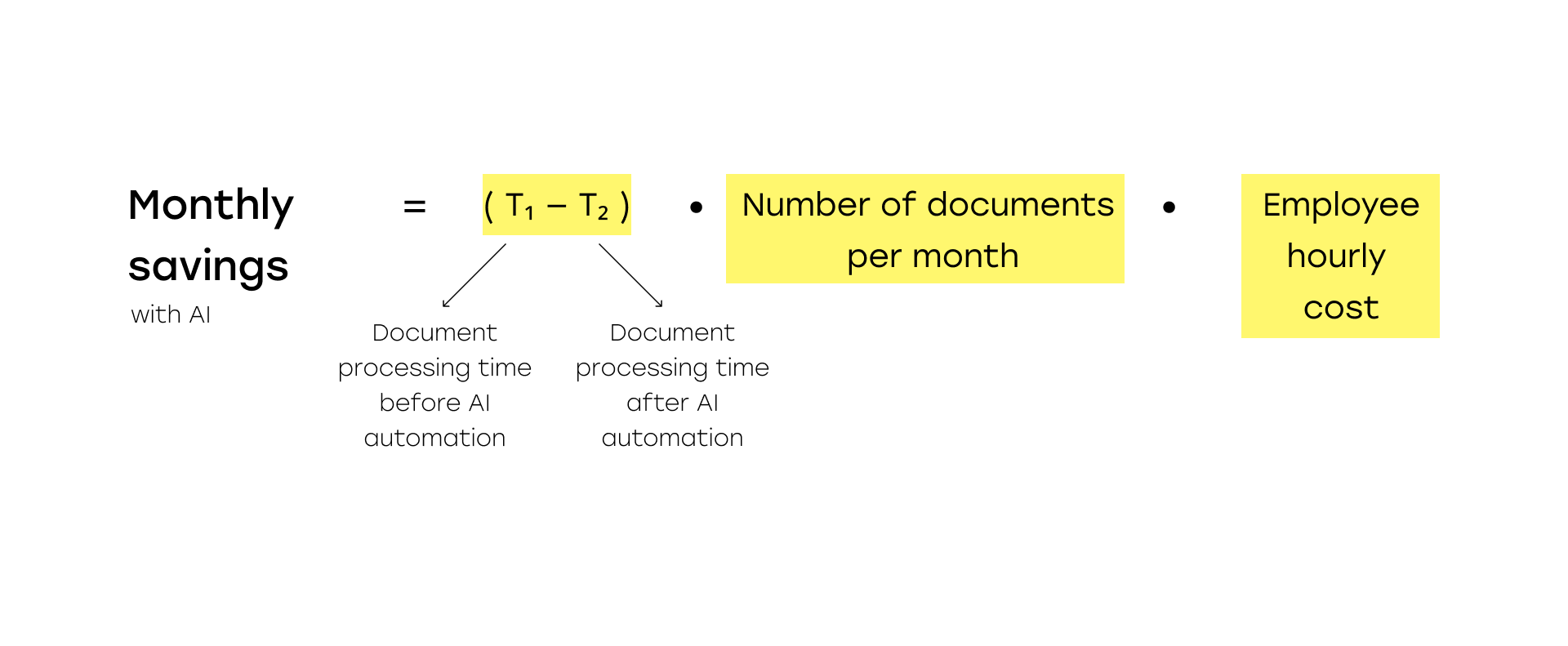
Monthly savings = (processing time per document before automation − processing time after automation) × number of documents per month × fully loaded hourly cost of the employee
For example, if a company saves an average of 20 minutes per document, processes 3,000 documents per month, and the fully loaded hourly cost of an employee is RUB 900, the direct effect from saved time alone can reach around RUB 900,000 per month. This does not yet include fewer errors, fewer manual returns, or the time gained at later stages of the process.
There is also a second useful formula:
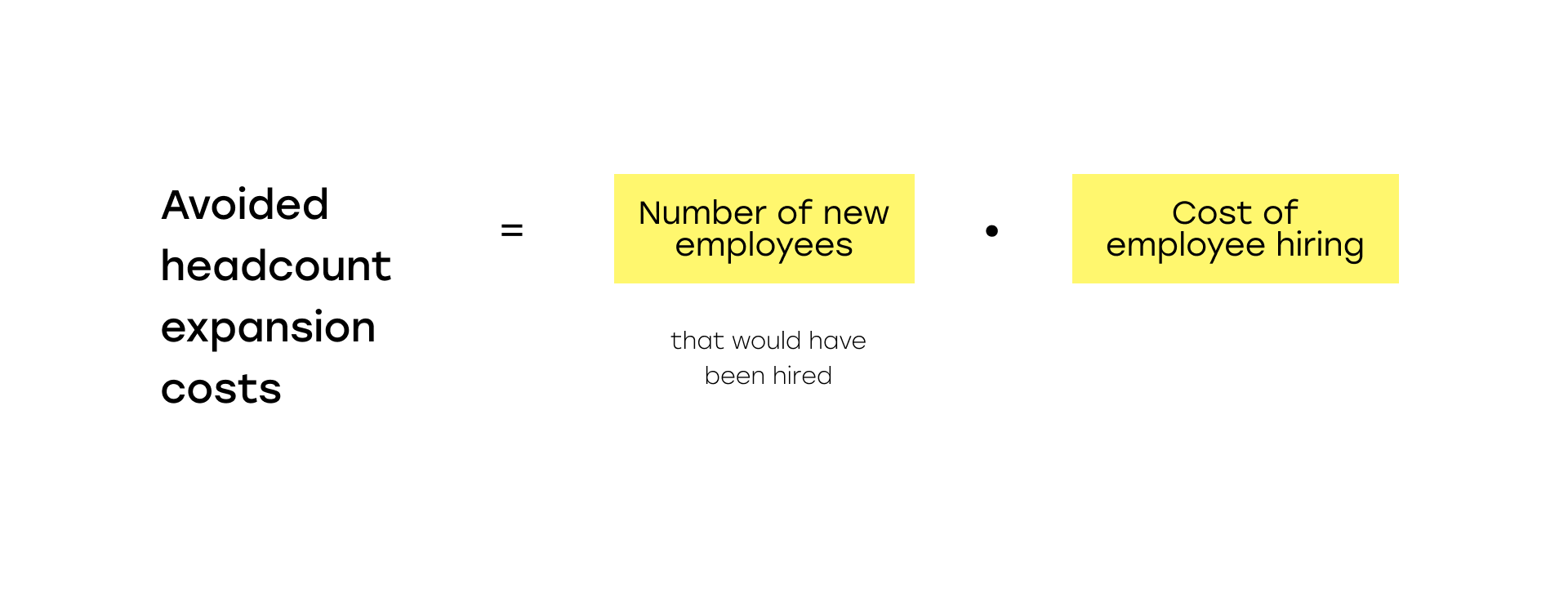
Avoided headcount expansion cost = number of employees the company would otherwise need to hire as volume grows × fully loaded cost of one employee
This model is especially useful for businesses with seasonality. If automation allows the company to pass a peak period without urgent hiring or overtime, this becomes a separate source of economic value.
It is important to remember that direct savings are not the only effect. Documents for the next stages are prepared faster, there are fewer manual checks between departments, the process becomes more predictable, and it becomes easier to control bottlenecks and processing quality. When a company can turn an incoming invoice into reliable working data faster, it wins not only in operating costs, but also in the speed of the entire document workflow.
That is why the right business question is not “how much does the AI module cost?” but “how much do we lose every month on manual processing, repeated checks, and delays in the document chain?” When automation is evaluated from this perspective, the economic benefit becomes much easier to see.
When AI automation for logistics and customs documents is especially valuable
The need for this type of automation usually becomes clear at a basic operational level: there are many documents, they come from different suppliers, they are written in different languages, they pass through several departments, and they require not only reading, but also translation, validation, normalization, and preparation of data for the next steps.
In practice, however, the decision to implement automation often matures not only because document volume is high, but also because of less obvious signals that directly affect business economics.
The first signal is that the company wants to grow, but understands that every new increase in document volume automatically requires more staff. As long as the process depends on people, scaling almost always means hiring more employees, redistributing workload, and increasing fixed operational costs. If a significant part of routine processing is automated, the business can grow without expanding the back office at the same linear pace.
The second signal is that management does not have clear visibility into the economics of the process itself. If the company cannot say exactly how much time one invoice takes, where errors appear most often, which stages accumulate delays, and which operations consume the most resources, the losses are already there. They are just spread across the process and are not always visible in reports.
In this case, automation is useful not only as a way to accelerate work, but also as a tool for making the process measurable. Once the business can see the cost of processing a document, the share of manual actions, and the bottlenecks in the workflow, it becomes much easier to make decisions about both optimization and further growth.
Conclusion
Manual invoice processing in logistics and customs clearance can look like a normal part of operations for a long time. Documents arrive, employees sort them out, data is entered into the system, and the process seems to work. But as volumes grow, hidden costs start to accumulate exactly at this point: processing time increases, the team becomes overloaded, delays appear, checks are repeated, and additional risk points emerge.
That is why document automation is not about “fashionable AI” and not about replacing people at any cost. It is a way to remove the most expensive and repetitive manual work from the process, accelerate document movement across the workflow, and make the operating model more stable.
The effect is especially visible when a company works with many suppliers, different document formats, multiple languages, foreign trade documents, and multi-stage internal processing. In these conditions, the value comes not from invoice recognition alone, but from the ability to automatically turn an incoming document into ready, verified, and usable data for logistics, internal accounting, and customs clearance.
Have an AI, automation, or custom software idea?
Request a free prototype and validate it before committing to a full build.