We know that international trade and customs clearance teams are already using ChatGPT, Claude, Gemini, and other LLMs as personal assistants for document processing. They upload invoices, packing lists, contracts, and other files and ask the model to extract specific data, translate product descriptions, or populate a working spreadsheet. Using AI to save time on routine document processing is no longer unusual.
For an individual specialist, this can work perfectly well. They upload the documents, write a prompt, get the result, and verify it before moving on if necessary.
The questions start when a company wants to scale this approach across a team and turn a personal productivity tool into a repeatable business process.
How do you make sure everyone processes documents according to the same rules? How do you verify which document and which fragment a particular value came from? What happens when the Invoice, Packing List, and Contract contradict one another? How do you distinguish data found directly in documents from calculations or assumptions made by the model? How do you control the use of multiple LLMs and token costs when hundreds of documents pass through them every day? And, most importantly, should a specialist still have to manually recheck the entire result after AI processing?
In other words, the main question is no longer whether an LLM can read a customs document and populate a table. Modern models can already do that reasonably well.
The real challenge of production-grade automation begins when an LLM response has to become a repeatable, verifiable, and controlled output that can safely move to the next step of a business process.
What Modern LLMs Can Already Do With Customs Documents
Modern multimodal models can already perform a significant portion of the work that only a few years ago required separate OCR and NLP components.
For example, an LLM can:
- read a PDF or scanned document;
- extract data from invoices and packing lists;
- understand table structures;
- translate product descriptions;
- convert information into a predefined tabular format;
- perform some cross-document matching.
Uploading documents to ChatGPT or Claude and asking the model to populate an Excel spreadsheet is a perfectly workable scenario. But this is also where the line between using an LLM as a personal tool and automating a business process becomes clear.
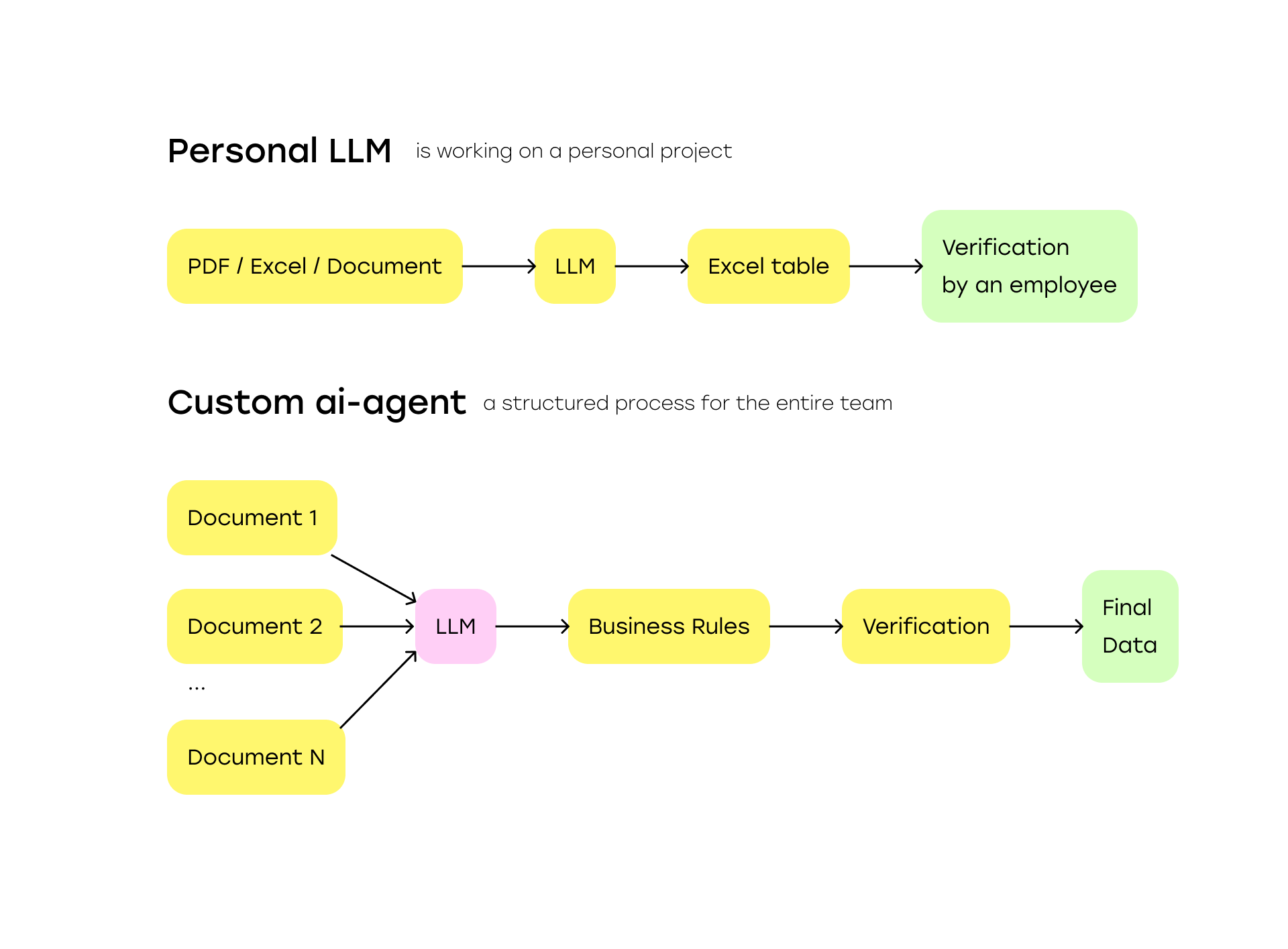
If the completed Excel file still has to be reviewed in full, questionable values traced back to their sources, and the resulting data manually transferred to the next system, the LLM may make the specialist faster, but the underlying process is still manual.
Claude Populated the Spreadsheet, but the Process Is Still Not Automated
In customs processing, different types of data can have very different levels of reliability. An invoice number, for example, is usually stated explicitly in the document and can be extracted almost as-is.
A product description for a customs declaration, on the other hand, may need to be assembled from several sources: an invoice, technical specification, manufacturer's catalogue, certificate, and internal reference data.
Other values may be calculated by the system. The total quantity, for example, may be the sum of several invoice lines. A final HS or customs classification code may require a separate classification step and expert review.
If all of these values simply appear in adjacent Excel cells, it becomes difficult for the specialist to understand which values can be trusted automatically and which ones require attention.
In a controlled process, it is useful to distinguish at least three categories of data:
- EXTRACTED – the value was found directly in a source document.
- CALCULATED – the value was calculated by the system using verified source data.
- ENRICHED – the value came from a catalogue, reference database, shipment history, or another additional source.
But these labels alone are not enough. The next step is being able to prove where every value came from.
1. Every Value Should Have a Traceable Source
For every automatically populated field, it should ideally be possible to determine:
- which document it came from;
- which page it was found on;
- which fragment of the document contains it;
- whether the value was extracted, calculated, or enriched from an external source;
- which validation checks it has passed.
This is commonly referred to as data provenance.
It becomes particularly important when an error is discovered later in the process.
Consider a simple example. Getting the following value is not enough: Quantity: 256.
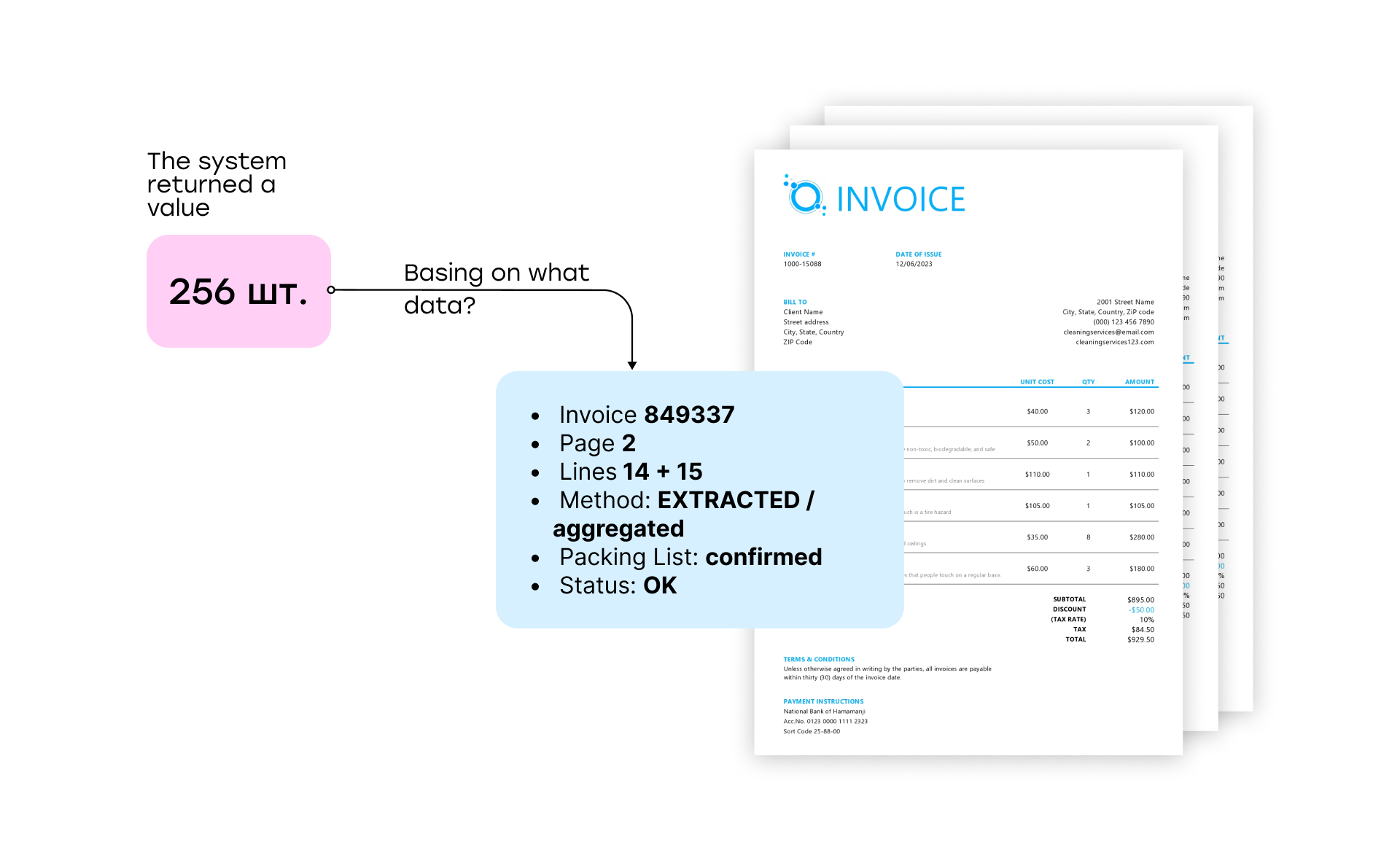
For a production process, it is much more useful to store something like this:
Quantity: 256
Source: Invoice 849337
Lines: 14 + 15
Method: EXTRACTED / aggregated
Validation: matches Packing List
Status: OK
Suppose a specialist sees a quantity of 256 units in the final specification and has doubts about it. In a regular LLM chat, they would have to return to the source documents, locate the relevant lines again, and figure out why the model produced that number.
In a controlled system, the user can immediately see both the source and the logic behind the value.
For customs document processing, knowing the model's answer is not enough. The user also needs to be able to quickly verify why the system produced that answer.
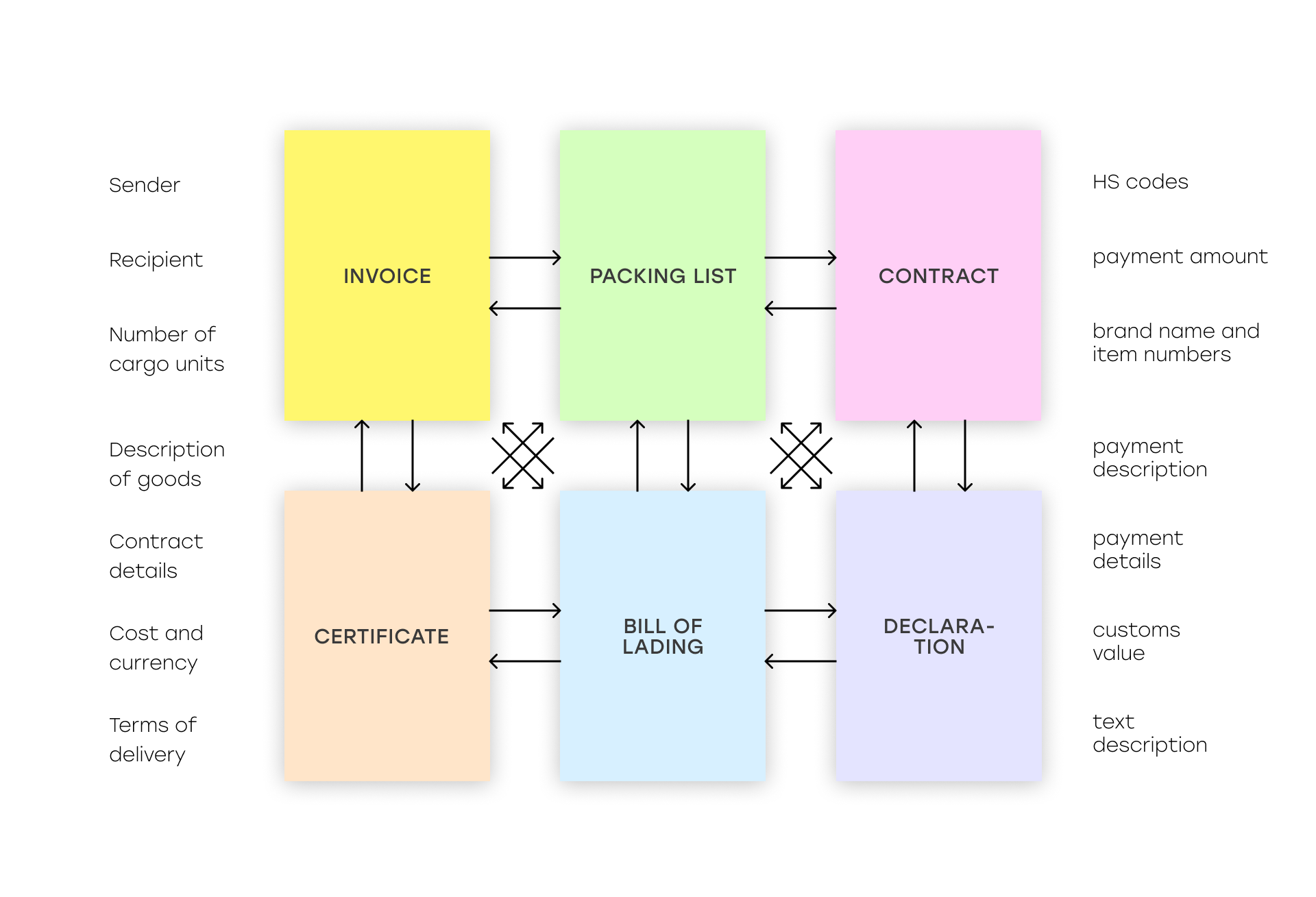
2. Validate Not Only Individual Documents, but the Relationships Between Them
A real shipment is rarely represented by a single PDF. A document package can include:
- Invoice;
- Packing List;
- Contract;
- transport document;
- Certificate;
- Transit Declaration;
- additional specifications and technical documents.
Automation therefore is not just about recognizing each file independently. The system also needs to check whether the information across the documents is consistent.
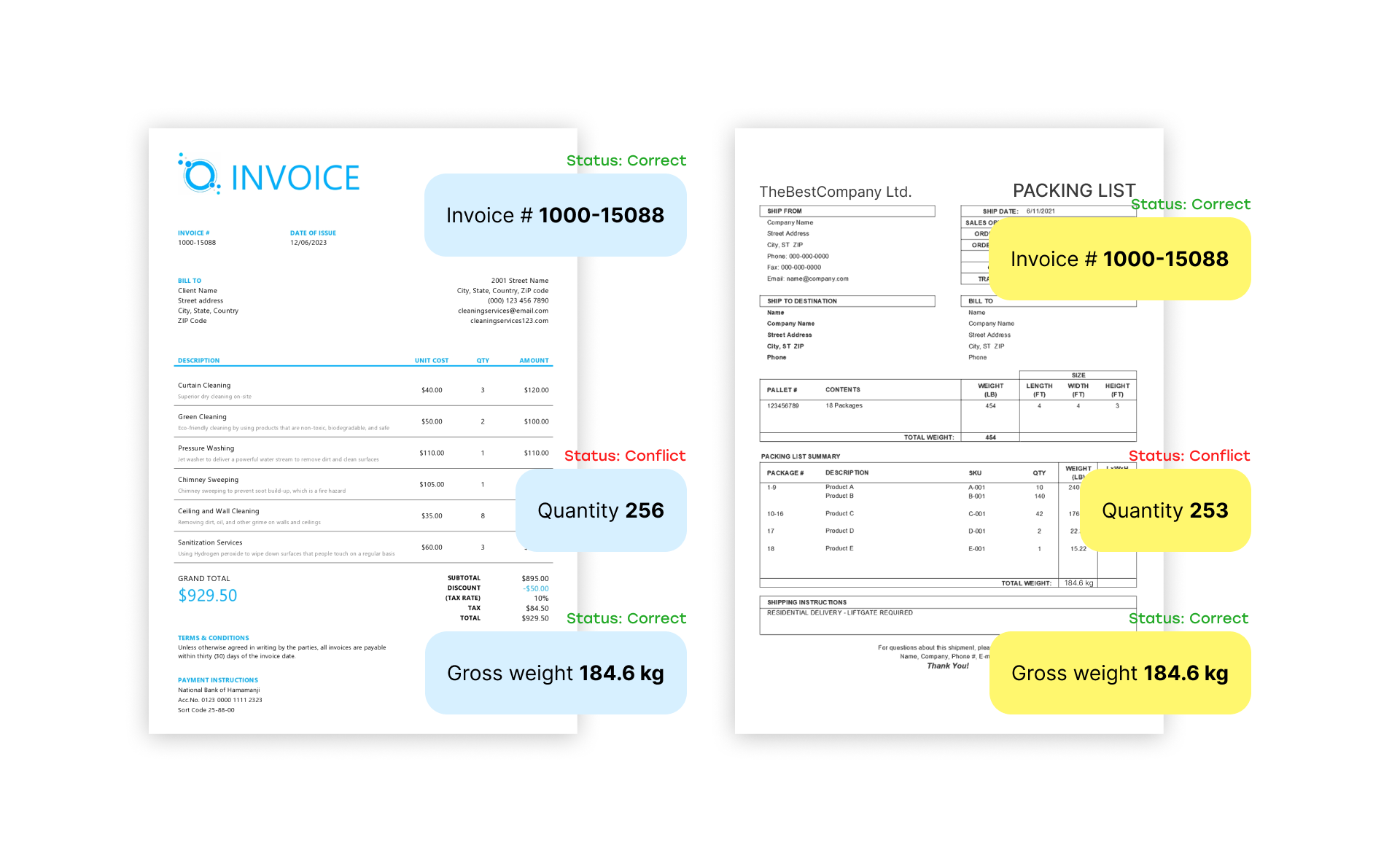
For example:
- Does the quantity in the Invoice match the quantity in the Packing List?
- Does the total weight in the Packing List match the transport document?
- Does the contract number stated in the Invoice match the uploaded Contract?
- Is the country of origin consistent across the documents?
- Do the stated Incoterms match?
- Is the specific item or SKU covered by the uploaded certificate?
- Are the HS / CN / customs classification codes consistent across the documents?
This is where a production system provides substantial additional value compared with using an LLM as a personal assistant.
Suppose the LLM correctly extracts FCA from the Invoice and EXW from the Contract. Individually, both extraction results are correct.
The problem only becomes visible after cross-document validation.
A production workflow therefore should not operate according to the instruction:
“Read these six PDFs and give me a table.”
It should work more like this:
“Extract the facts from each source, connect them, and validate them against predefined business rules.”
3. A Good System Should Be Able to Say “I Don't Know”
This is one of the most important differences between controlled automation and simply sending a request to an LLM.
Consider a Packing List.
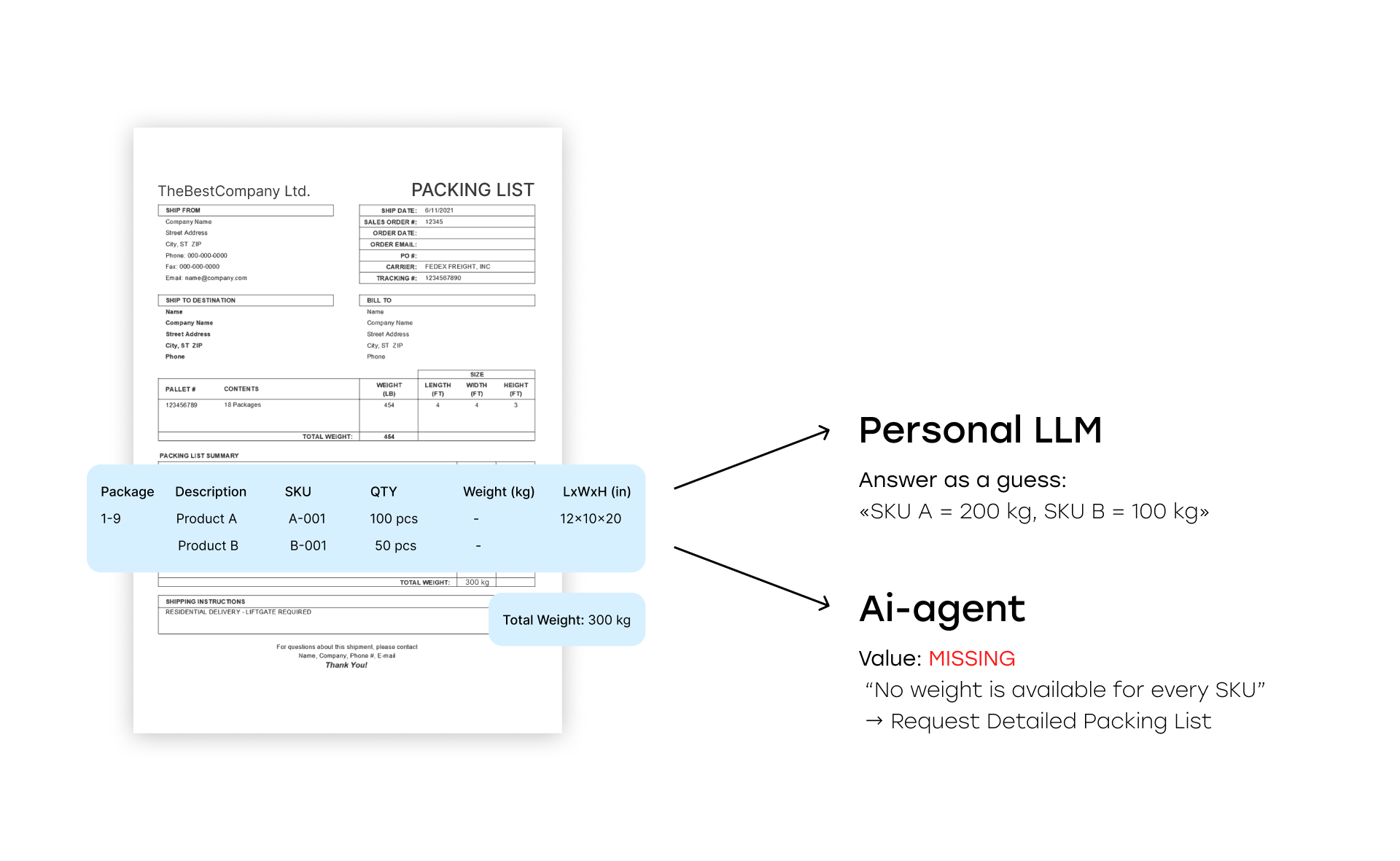
A mixed pallet contains two different SKUs. The document specifies the total net weight and gross weight of the pallet, but does not provide the weight of each SKU separately.
In theory, the model could try to distribute the weight proportionally based on item quantities. But doing so requires an assumption: that one unit of the first SKU weighs the same as one unit of the second.
If the documents provide no evidence for that assumption, the system should not invent the calculation simply to populate a cell. The correct result in this case is Status: MISSING.
If the Packing List contains only the total weight of a mixed pallet, the weight of an individual SKU cannot be determined from the available documents.
Required: Detailed Packing List / SKU-level Weight Breakdown.
This is an important change in logic.
The goal of automation is not to achieve 100% populated fields at any cost. It is to identify what information is missing and explain why.
The same principle applies to conflicts.
If the Invoice contains one Incoterm and the Contract contains another, the model should not independently decide that the Contract is “usually more reliable” and silently select its value.
The result should be CONFLICT – specialist confirmation required.
The rule is simple: if several valid sources contradict one another, the system should surface the conflict rather than hide it behind its own assumption.
4. Human-in-the-Loop Should Mean Working With Exceptions
The statement “a human makes the final decision” says very little about the actual level of automation.
If a specialist still has to review every line, open every PDF, and manually verify every value after the documents have been processed, we have simply added another tool in front of the existing manual process.
A more useful approach is exception-based HITL.
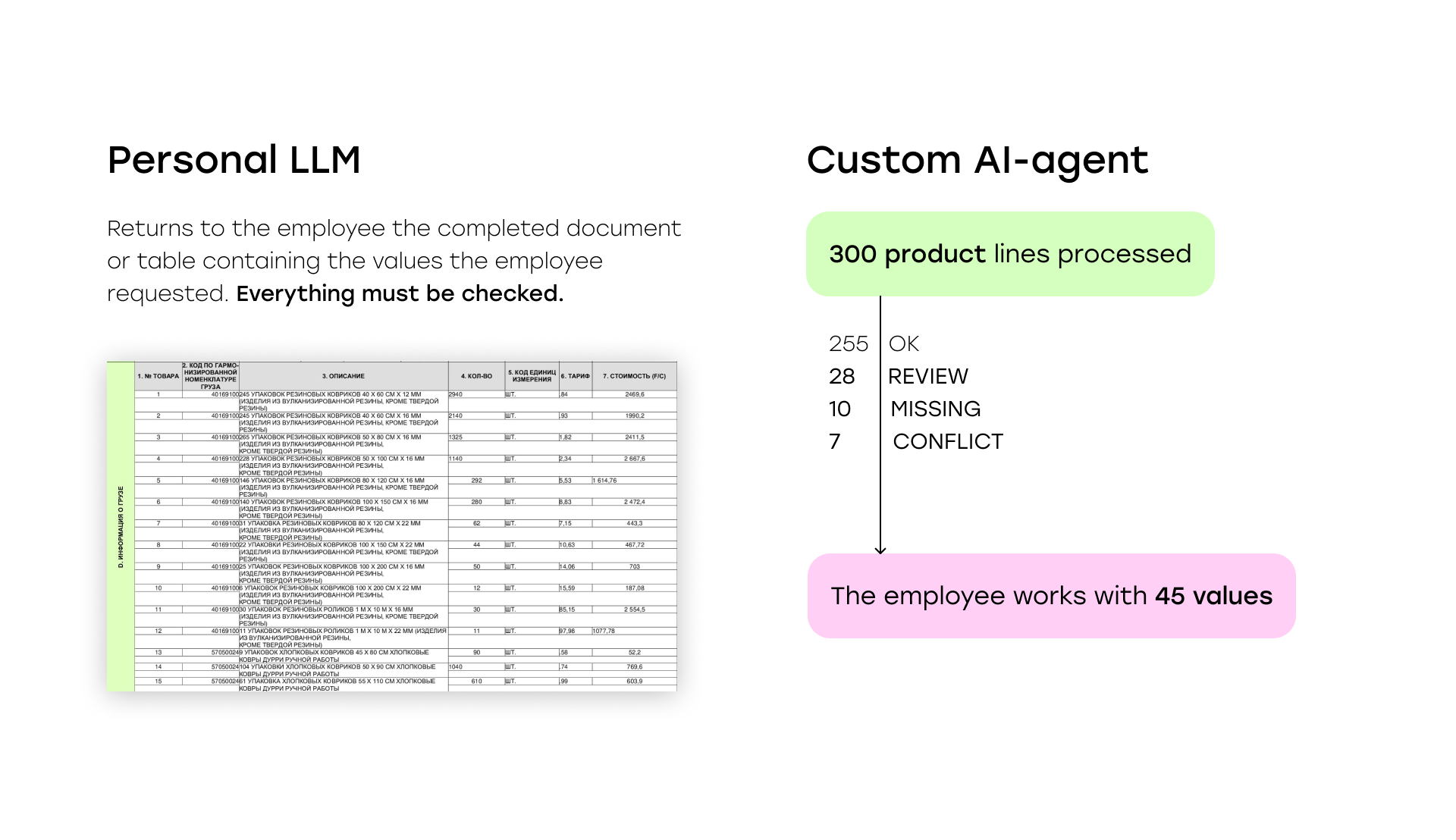
Imagine a document package containing 300 product lines.
After automatic extraction and validation, the system classifies them as follows:
- 255 – OK
- 28 – REVIEW
- 10 – MISSING
- 7 – CONFLICT
The specialist now needs to review only 45 exceptions instead of rechecking all 300 lines.
The main purpose of HITL in this model is to replace repeated manual verification of the entire document package with work on exceptions only.
This is what determines how effectively the automation can scale to larger document volumes.
5. Reporting Missing Data Is Not Enough. The System Should Explain What Is Missing
The MISSING status can also be made significantly more useful. The system should not stop at saying: “Net Weight is not populated.”
It can identify the reason and suggest which source is required to continue the process.
Example: SKU-level weight is missing
Reason: the Packing List contains only the total weight of a mixed pallet.
Required document: Detailed Packing List / SKU-level Weight Specification.
Another example: insufficient data for a complete product description
Reason: the Invoice contains only an item number and a short commercial product name.
Required source: Manufacturer Catalogue / Datasheet / Technical Specification.
Another scenario: supporting compliance document not found
Reason: the uploaded certificate does not contain the relevant item number.
Required: a Certificate / Declaration of Conformity covering the product.
This leads to a logical next step in the system's evolution: a form of Missing Documents Engine.
Based on detected gaps and predefined business rules, the workflow can do more than flag an empty field. It can explain what evidence or document is missing.
This does not mean building a universal algorithm capable of determining every mandatory document for every possible shipment. Those requirements depend on the product, customs procedure, jurisdiction, and internal company policies.
But for repeatable scenarios within a particular organization, a significant part of this logic can be formalized.
What This Looks Like in Practice
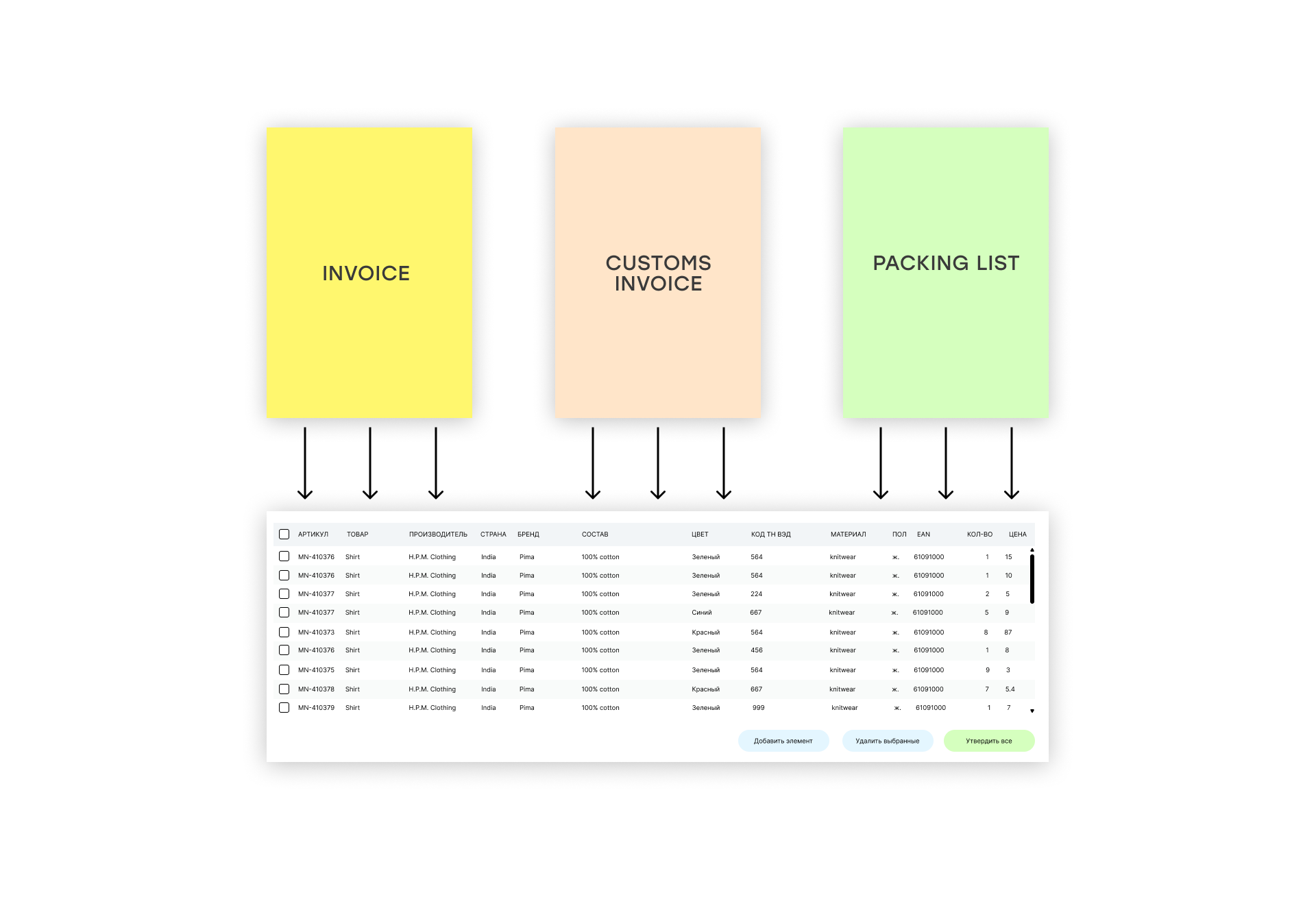
In one of the systems we developed, the workflow receives three main document types:
- Invoices;
- Packing Lists;
- Customs Invoices.
The system uses these documents to build a large product-level dataset.
The extracted fields include:
- item number;
- product name;
- manufacturer;
- country;
- brand;
- composition;
- size;
- color;
- quantity;
- unit price;
- EAN;
- customs classification code.
But field extraction is only the beginning. The data is then transformed into a unified specification according to the client's business rules.
Product information is consolidated and normalized, including composition and materials, dimensions, manufacturer and manufacturer address, GTIN and EAN, number of packages, value, internal identifiers, and other required attributes.
In other words, the task is no longer simply to convert a PDF into JSON or Excel.
The system has to understand the structure of the source documents, collect information from different parts of the document package, and normalize it into a single format used by the company.
We do not have visibility into the client's downstream process after this specification is generated, so it would be incorrect to claim which subsequent operations are fully automated.
However, this example clearly illustrates the difference between data extraction and a production workflow:
Data extraction is the first step, but the main value appears when that data is automatically aligned with the company's business rules and becomes ready for the next step in the process.
Personal ChatGPT and an Enterprise AI Workflow Are Different Levels of Automation
| Working With a Commercial LLM | Production AI Workflow |
|---|---|
| The employee uploads documents manually | Documents automatically enter a unified workflow |
| Each employee can use their own prompt | The same business rules apply to everyone |
| The model returns a final answer | The source is stored for every value |
| The answer has to be manually verified | Automatic validation is performed before human review |
| Uncertainty may remain hidden inside the answer | REVIEW / MISSING / CONFLICT statuses are surfaced explicitly |
| The employee reviews the entire result | HITL focuses on exceptions |
| The result is manually transferred to the next step | Structured output is generated for the downstream system |
| Employee corrections remain fragmented | History, rules, and approved decisions can be accumulated centrally |
This does not mean that the second option is always better. The difference is primarily about scale and process requirements. It also depends on the cost of the AI solution and whether the investment makes economic sense for the organization.
What About Cost?
Cost also becomes a noticeable factor once a team starts using AI tools regularly.
If the same operation is performed every day by, for example, 8-10 specialists, the company is no longer paying for a single personal tool. It is paying for an entire set of user subscriptions.
An enterprise workflow makes it possible to select models centrally, control the number of requests, and use APIs directly for specific operations without necessarily giving every employee the highest-tier AI subscription.
But it would be misleading to claim that a custom system is automatically cheaper.
It also comes with development, integration, infrastructure, and ongoing maintenance costs.
Economics is therefore only one factor.
In most cases, the more important reasons for moving to an enterprise system are:
- control;
- repeatability;
- automatic validation;
- controlled HITL;
- integrations;
- audit trail;
- centralized business rule management;
- and only then, cost optimization.
When Customs Teams Do Not Need a Dedicated AI System
Automation for its own sake rarely makes sense. In many cases, standard ChatGPT or Claude may genuinely be the best solution.
Especially when:
- document volumes are low;
- only one or two specialists work with them;
- the task occurs infrequently;
- the final output is easy to verify;
- there are no complex integrations;
- there is no need to make the entire team follow the same processing rules.
If a specialist processes five document packages per month and can verify the resulting spreadsheet in a few minutes, building a dedicated workflow may simply not be worth the organizational overhead.
The situation changes when:
- document volumes increase;
- processing happens every day;
- an entire team works with the documents;
- the same validation checks are repeated again and again;
- there are fixed processing rules;
- the cost of an error is high;
- a significant portion of the LLM output still has to be manually verified;
- the resulting data needs to be passed into an ERP, customs declaration preparation system, or another internal application.
This is the point where a personal AI tool starts becoming an infrastructure problem.
What the Target Workflow Can Look Like
A simplified architecture for this type of solution can look like this:
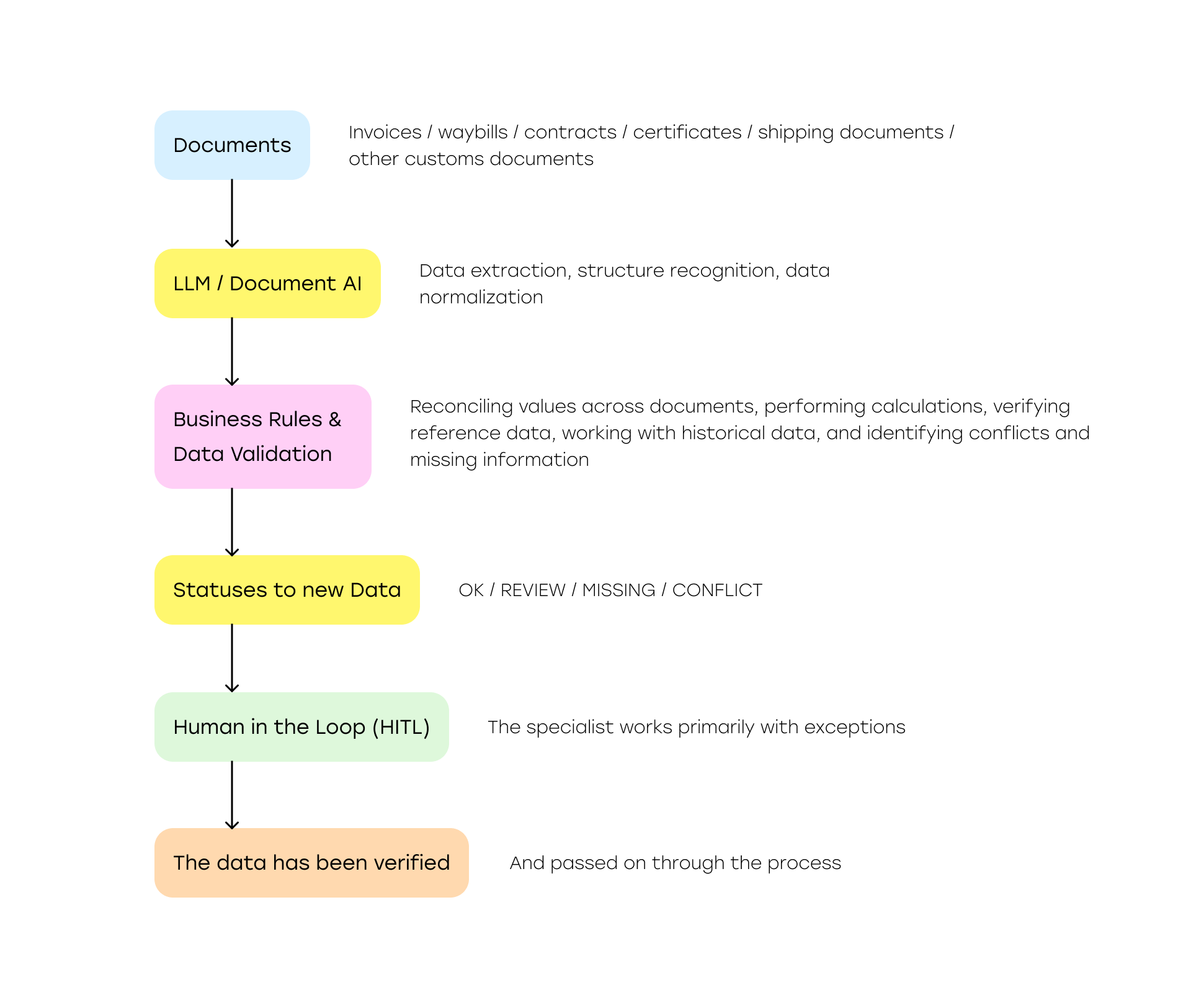
In this architecture, the LLM does not take over the entire process. Instead, it becomes a powerful document reading and interpretation component inside a more controlled system.
Business rules determine what can be accepted automatically. Cross-document validation checks whether data is consistent. Statuses make uncertainty explicit. HITL allows specialists to focus on cases that genuinely require expert judgment.
The goal is not to remove people from the process entirely or to automatically generate and submit customs declarations without specialist oversight. The objective is much more practical: reduce as much as possible the amount of information a specialist has to search for and manually verify.
From an LLM Answer to a Controlled Business Process
IT companies no longer need to prove that an LLM can read an invoice, understand a table, or populate a predefined form. Modern models already do this well enough that customs specialists have started using them independently in their day-to-day work.
The next business challenge is more difficult: making the result repeatable and verifiable.
That requires tracing every value back to its source, separating extracted, calculated, and enriched data, automatically validating documents against one another, surfacing uncertainty explicitly, and preventing the model from silently resolving conflicts on its own.
And instead of sending the entire document package back to a human for another full review, the system should surface only the exceptions that genuinely require expert judgment. This is what turns an employee's personal AI tool into production-grade automation.
Are Your Customs or International Trade Teams Already Using AI to Process Documents?
Show us a typical document package and the output your specialist needs to produce. We can help determine whether a general-purpose LLM is enough for the task, or whether it makes sense to add validation rules, HITL, and an automated workflow.