Imagine a 30-page PDF filled with architectural elevations. Each page contains a kitchen, bathroom, or office layout with rows of cabinets. Your task is to identify every cabinet on the drawing, determine its type, count doors and shelves, extract dimensions, and then find the best matching items in a furniture catalog with hundreds of SKUs.
In construction and interior design, this work is still done manually. Specialists spend hours going through catalogs, comparing dimensions and specifications. Construction companies, design studios, and contractors all face the same routine that takes dozens of man-hours per project.
We set out to automate this process and built a system that takes a PDF with architectural drawings and a furniture catalog as input, and outputs recommendations with 87% accuracy.
In this article, we’ll walk through how we moved from a naive belief in all-powerful vLLMs to a structured pipeline combining YOLO detection, computer vision clustering, Gemini for feature extraction, and transformers for semantic catalog search.
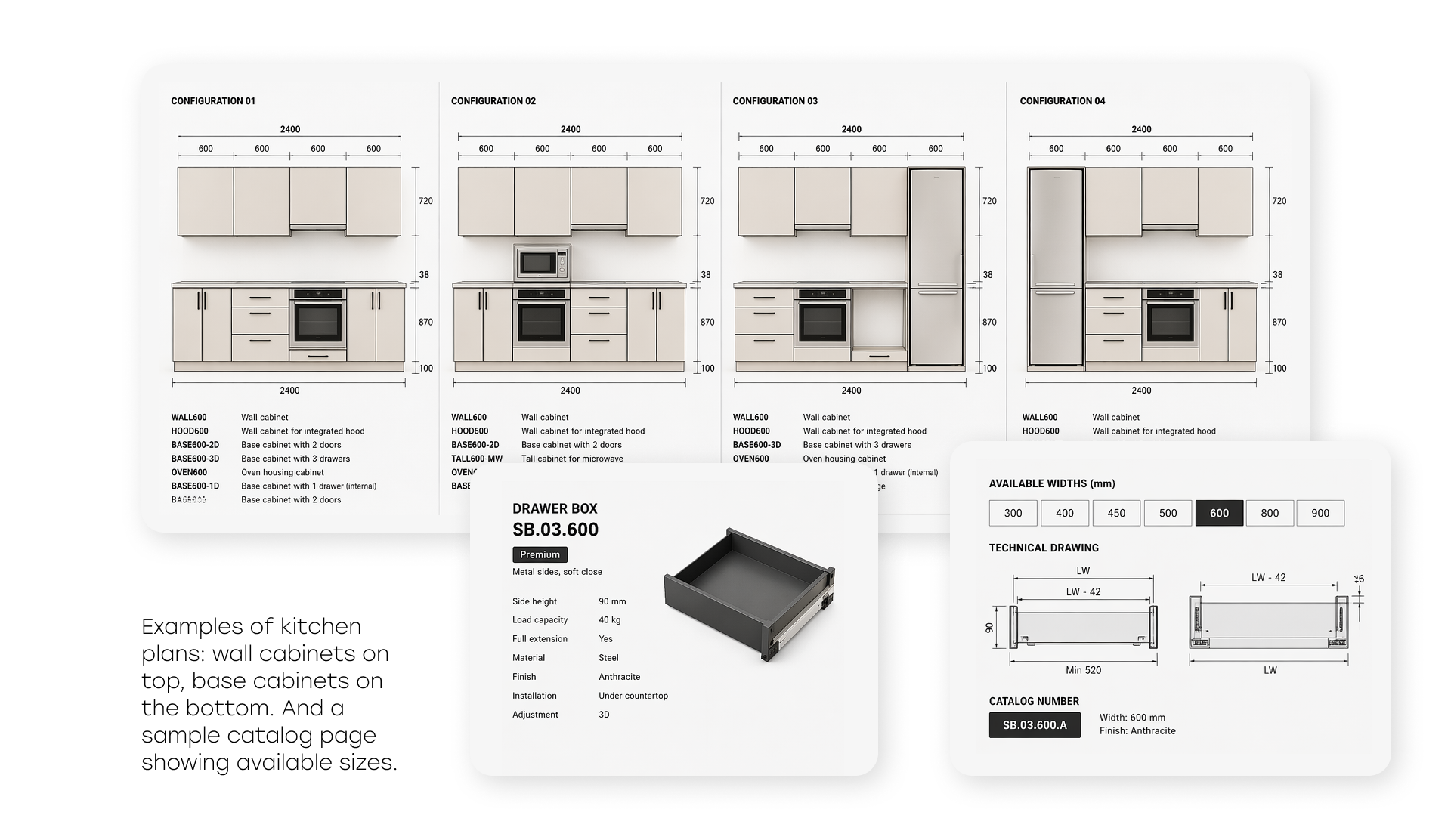
Experience AI for Engineering Drawings
The Naive Approach: Feed Everything into an LLM
The initial idea was simple, and, as it turned out, naive. Why build a complex system if you can just send the drawing image and the catalog PDF directly into a multimodal model? Take the best vLLM, put everything into context, and get the result.
We started with Gemini 2.5 Pro, which at the time showed the best performance on visual tasks. We sent a floor plan image along with a reduced catalog of 15 pages, each containing 10–16 cabinets. For simple furniture types, the model worked reasonably well and could recommend relevant items.
However, problems appeared when scaling. Once the catalog grew from 15 to 120 pages (around 1,500 cabinets), the model began to struggle with the volume of information. Several fundamental issues became clear:
- Modality mismatch: the catalog uses 3D renders, while drawings are 2D. Visually, these are very different representations of the same objects, and the model often fails to match them.
- Cabinet type specificity: each type (pull-out, wall-mounted, sink unit, shelving) has its own features and selection rules. A single prompt cannot capture all nuances, and the model cannot retain them reliably.
- Counting errors: the model consistently miscounted cabinets and hallucinated dimensions, which are critical parameters for matching.
We then tested three leading models on a dataset of 20 plans with the full catalog (120 pages):
| Model | Accuracy | Strengths | Weaknesses |
| Gemini 2.5 Pro | 34% | Strong visual understanding | Counting errors, hallucinated dimensions |
| GPT-5 | 8% | Better counting | Fails to match catalog items |
| Grok 4 (xAI) | 17% | Balanced performance | Weaker visual analysis than Gemini |
The results were disappointing. None of the models came close to acceptable quality. It became clear that the task is too complex for a single end-to-end vLLM solution.
Before abandoning this approach, we tried structuring the catalog using RAG (Retrieval-Augmented Generation). The idea was to encode the catalog in a way that would help the model navigate it better.
We tested several indexing strategies for the PDF catalog, including page-level chunking and semantic segmentation. RAG slightly improved catalog search quality (up to ~40% for Gemini), but the core issues remained: incorrect counting, dimension hallucinations, and confusion between cabinet types.
These errors were rooted in visual analysis. At that point, we made a key decision: split the task into specialized subtasks and use the most suitable tool for each. This became the turning point of the project.
Task Decomposition and Final Architecture
After analyzing errors and strengths of different approaches, we broke the problem into five sequential stages:
- Stage 1. Cabinet detection
- Stage 2. Cabinet clustering
- Stage 3. Dimension extraction
- Stage 4. Feature description
- Stage 5. Semantic search and ranking
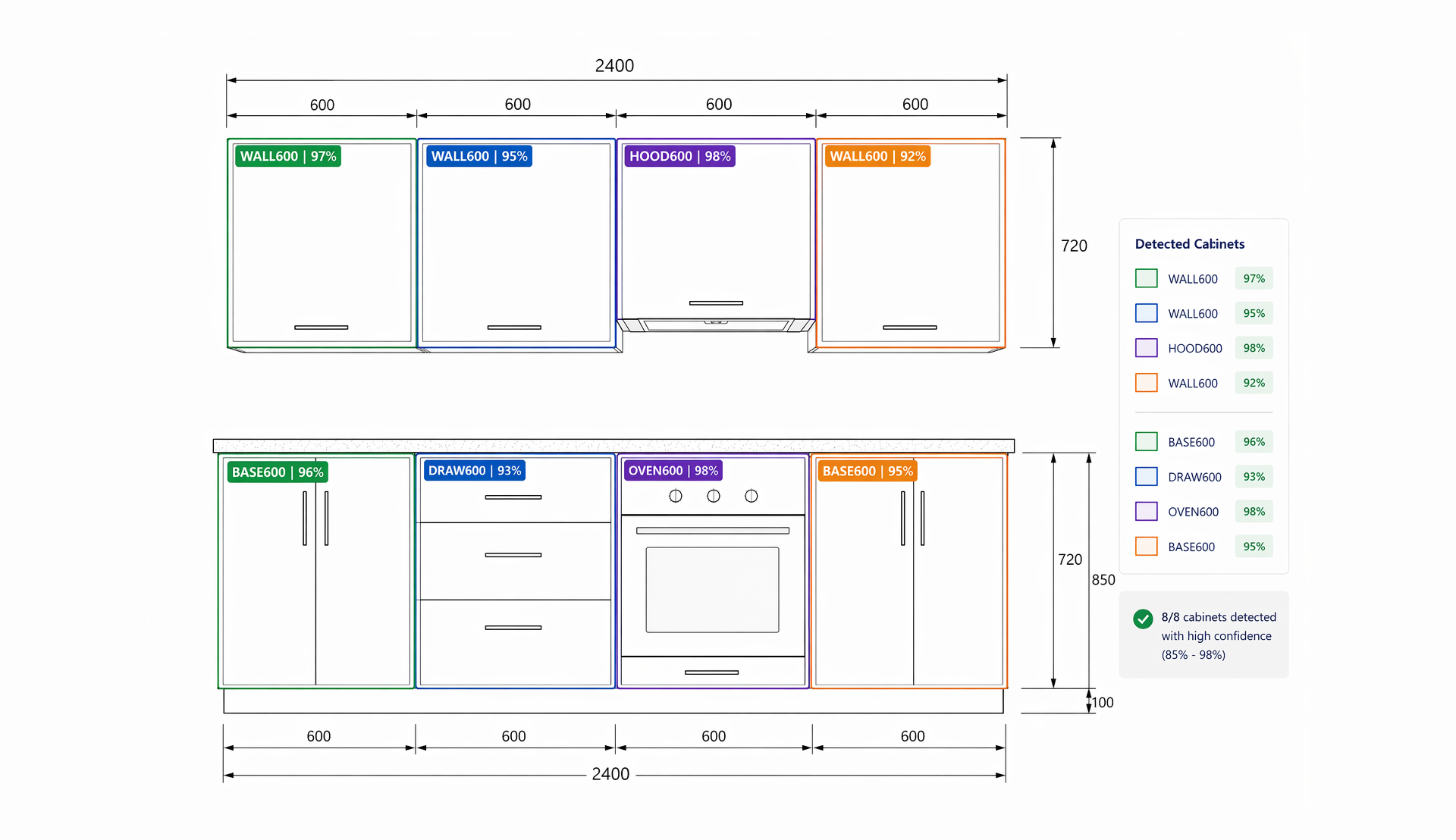
Stage 1. Cabinet Detection
The first and most critical step is accurately detecting each cabinet on the drawing. Errors at this stage propagate downstream.
We annotated over 5,000 original plans with cabinet classes. The final detector achieved 96% accuracy (mAP@0.5) on the test dataset, which is strong given the variability of architectural styles.
The most challenging issue was nested cabinets. In drawings, some cabinets are visually embedded within others.
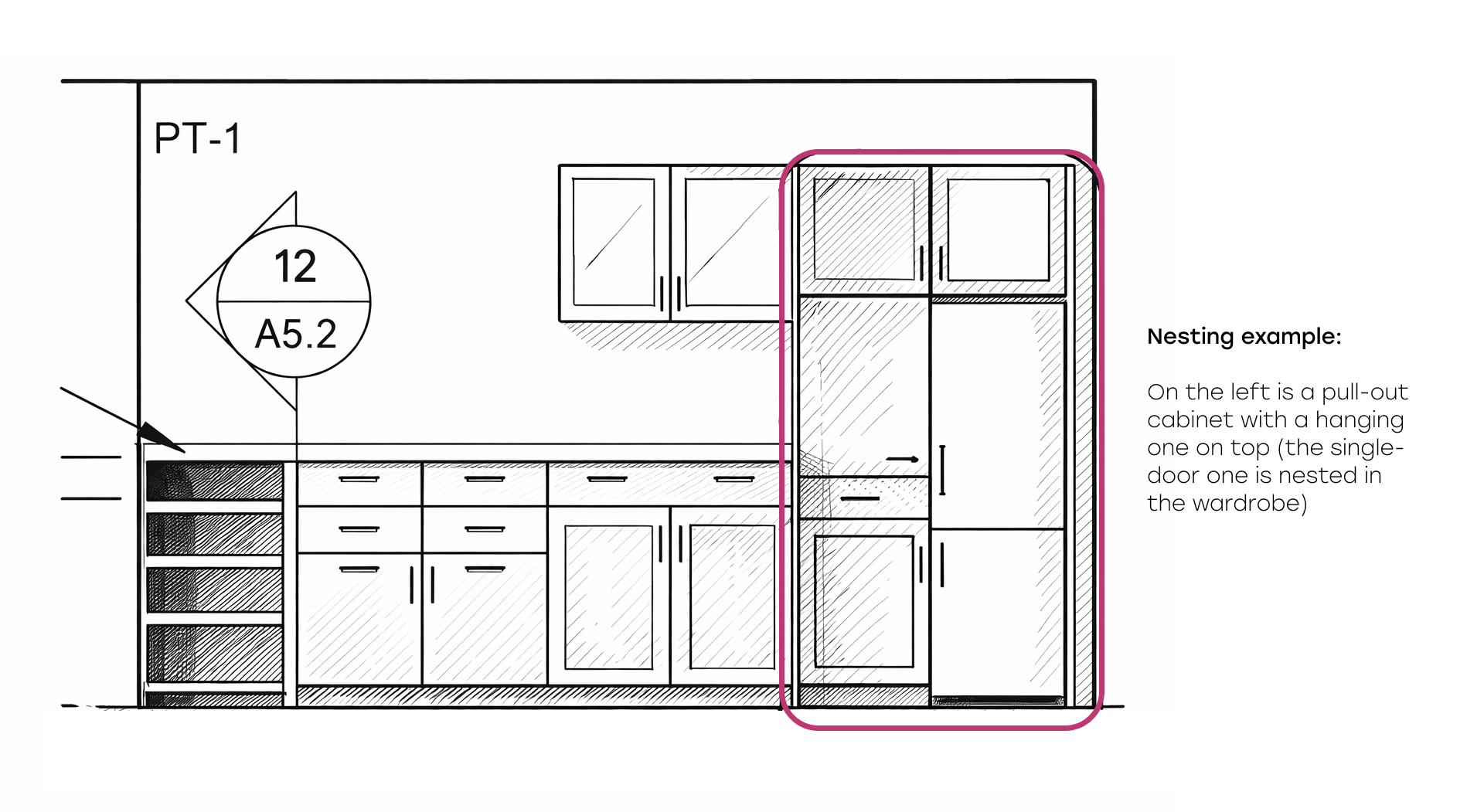
For example, a tall cabinet may consist of an upper wall cabinet and a lower section. A two-door cabinet may be composed of two single-door units. The model must recognize these as a single object rather than multiple components.
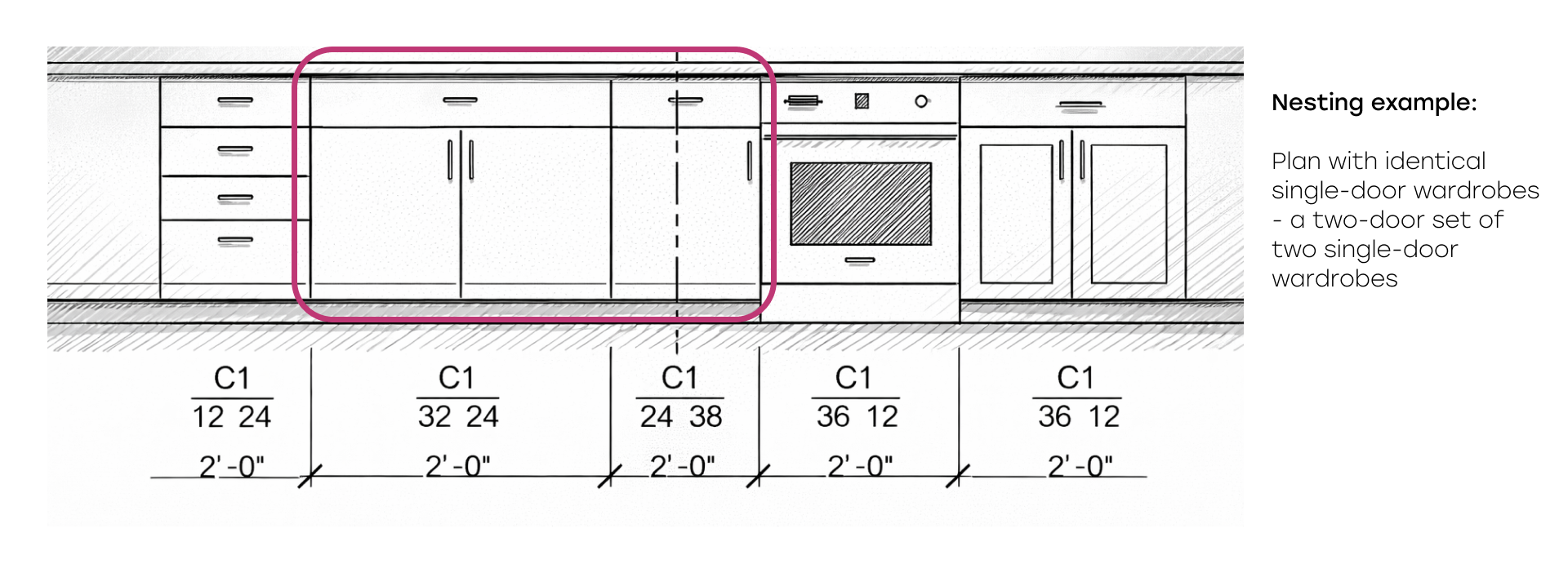
We solved this by introducing hierarchy rules for detected bounding boxes. The algorithm analyzes overlaps, builds parent-child relationships, and removes duplicates. For instance, if a single-door cabinet is fully contained within a two-door cabinet, the system treats it as an aggregated structure.
Stage 2. Cabinet Clustering
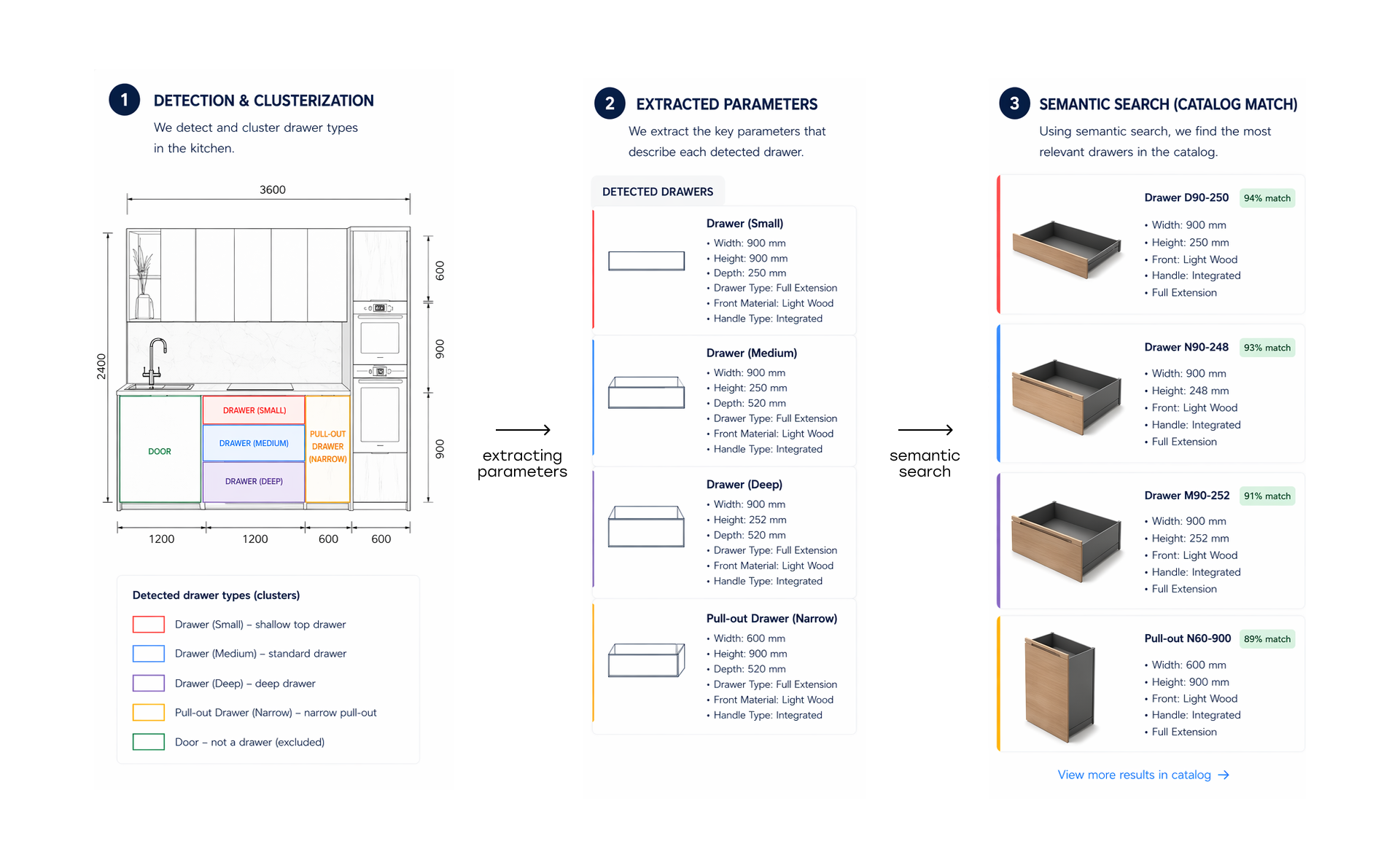
After detection, visually identical cabinets must be grouped.
This is important because:
- It allows accurate counting of identical cabinets
- It reduces processing, as only one representative needs to be analyzed
We implemented two approaches depending on cabinet type:
- Keypoint-based clustering using pairwise distance matrices, effective for cabinets with distinct visual features (handles, door patterns)
- Normalization-based similarity, effective for geometric patterns
Stage 3. Dimension Extraction
Dimensions are critical for catalog matching. However, drawings represent them in multiple ways: dimension lines, codes (e.g., ZW 34|24|36 for Height|Depth|Width), or text labels.
We considered detecting dimension annotations and linking them to cabinets, but drawing styles vary too much. Building a universal detector would be as complex as the entire pipeline.
Instead, we used a vLLM approach: sending a cabinet crop along with the full plan image and asking the model to locate the cabinet and extract dimensions.
On a test set of 100 plans:
- Gemini 2.5 Pro achieved 81% accuracy
- Gemini 3 improved it to 87%
This improvement significantly boosted the overall system.
Benchmark: Best AI Models For Engineering Drawing Processing
Stage 4. Feature Description and Catalog Preparation
4.1 Feature Description
This is the core of the system. Matching quality depends on how accurately each cabinet is described.
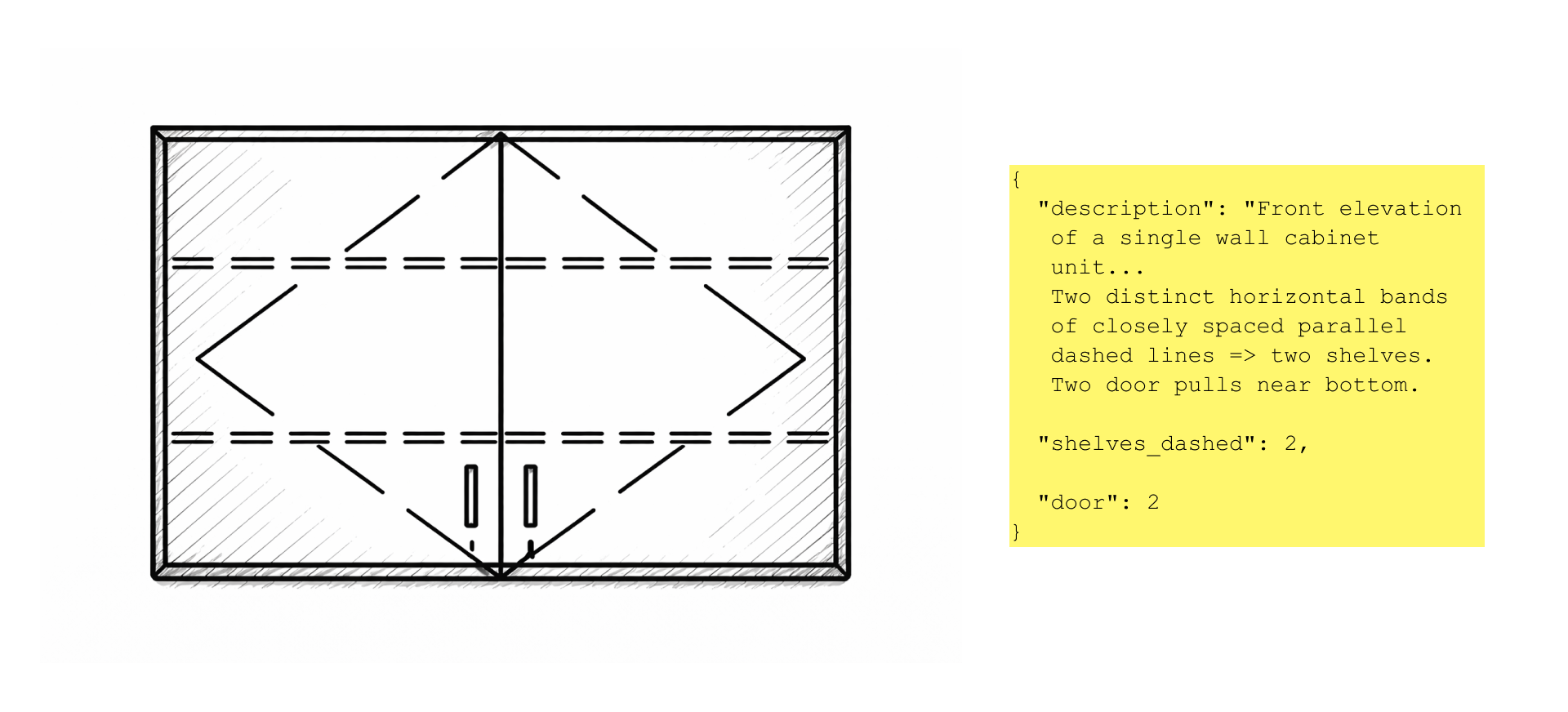
We generate a structured JSON for each cabinet with a defined set of features specific to its class.
Each cabinet type has its own prompt. For example, wall cabinets include glass detection, while sink cabinets ignore this feature. Prompts contain detailed instructions for interpreting drawings.
We compared three models:
| Model | Recommendation Accuracy | Typical Errors |
| GPT-5 | 62% | Counting errors, brief descriptions |
| Gemini 2.5 Pro | 75% | Issues with glass and shelves |
| Gemini 3 | 88% | Minimal errors, precise feature extraction |
Switching to Gemini 3 provided the largest improvement.
4.2 Catalog Preparation
In parallel, we converted the furniture catalog into a machine-readable format.
Each SKU is described as JSON with the same feature set as detected cabinets.
We used GPT-5 to generate textual descriptions from 3D renders and extract features. The catalog is stored as a collection of JSON files.
We chose text-based features because visual similarity alone is insufficient. Many cabinets look similar but differ in shelves, glazing, or configuration. Text allows precise differentiation.
Stage 5. Recommendation System
The final stage selects the top 3 matching catalog items for each cabinet.
The process includes three phases:
- Filtering: applying class-specific constraints with three passes and gradual relaxation
- Dimension check: validating size compatibility, with fallback if no match is found
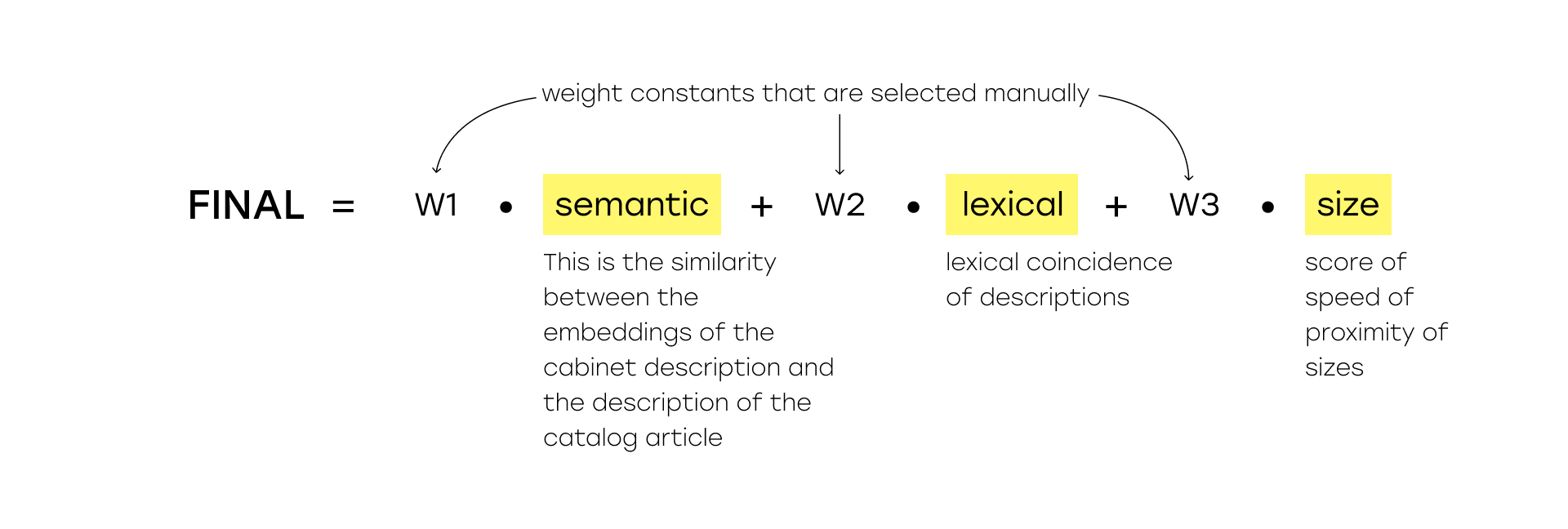
- Ranking: scoring candidates using a composite metric combining semantic similarity, lexical match, and size proximity. Here you can see the composite score formula, where semantic is the similarity of the embeddings of the cabinet description and the description of the catalog article, lexical is the lexical match of the descriptions, size is the size proximity score, if there is no exact one, w1, w2, w3 are weight constants that are selected manually.
Results
Final system performance:
| Metric | Value |
| Cabinet detection | 96% |
| Dimension extraction | 87% |
| Feature description | 88% |
| Recommendation accuracy | 87% |
Compared to the initial LLM-only approach (max 34%), the final system achieved 87% accuracy — more than 2.5× improvement.
Processing time is 5–7 minutes per document, significantly faster than manual work.
Conclusions
LLMs are not yet universal. Despite impressive demos, multimodal models still struggle with complex tasks requiring counting, dimension reading, classification, and large-scale search. Breaking the problem into stages improved performance significantly.
Domain-specific rules matter. Without custom filters and hierarchy logic, matching quality drops. Domain knowledge cannot be replaced by neural networks alone.
Gemini 3 is a major step forward for visual tasks. Switching from Gemini 2.5 Pro to Gemini 3 improved performance by 6–13% across stages. The quality of architectural drawing analysis increased substantially.